52.2.6 Split Mode - General parameters
In the following Chapters, we will look at how to configure Etere Adinsertion in split mode.
ad_insertion_automation
AD INSERTION SPLIT MODE CONFIGURATION
If the Operating Mode is set to:
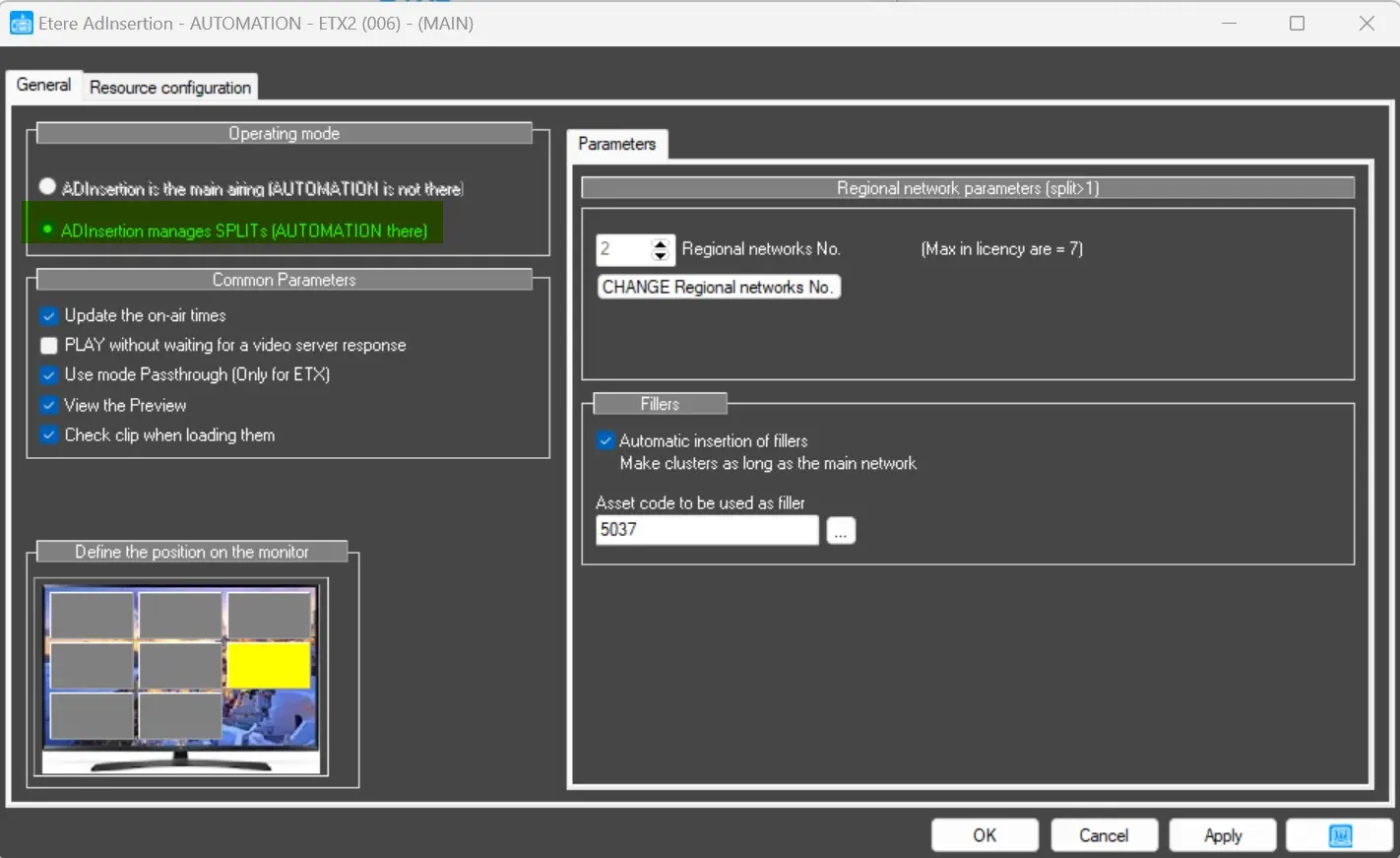
AdInsertion manages SPLITS (AUTOMATION there)
The following parameters would be eventually shown, and it would be possible to change them by needs:
Regional Network parameters
Regional network No.: It allows the operators to manually set the number of SPLITS used.
CHANGE Regional networks No.: In order to change the number of regional networks, the user have to click on this button and enter a confirmation password. The parameter above will become eventually editable.
Fillers
In this section, we can set up a FILLER asset, which will be used in case the MAIN NETWORK Commercial Break is longer than the Regional Networks ones. In that case, the FILLER would fill the time gap between MAIN Network and Regionals.
Automatic insertion of Fillers: It allows to automatically Air Ad Insertion filler when a time GAP between MAIN and Regionals occurs.
Asset Code to be used as filler: It allows to select an asset as FILLER. The given asset would be played whenever the time gap occurs.
Module shortcut
In order to start Ad Insertion in SPLIT mode, it's necessary to specify the split number (greater than 1) in the Target field of the shortcut, alongside the station:
"C:\Program Files (x86)\Etere\Etere.AdInsertion.exe" user.006 2 GO
otherwise the module assumes the split to manage is the n.1, therefore starts as the main airing program, so in AUTOMATION mode.
In the example above, Ad Insertion will be launched for the 6th station and the managed split is the n.2.
 ad_insertion_automation