56.2.1.7 Automation commands
The table provided in this section lists all the commands supported by Etere Automation for the transmission playback, detailing the modules (i.e. automation, control panel, etc.) from which they can be used:
FUNCTIONS INFO:
AVAILABLE FOR:
Start - Start the broadcast transmission (see using the on-air).
AVAILABLE FOR: OA-(Yes), GPI-(Yes), RP-(No), CP-(Yes) .
Stop - Stop the broadcasting transmission.
AVAILABLE FOR: OA-(Yes), GPI-(Yes), RP-(Yes), CP-(No) .
D-Stop - Delayed stop. Stop broadcasting when the currently playing event is finished.
AVAILABLE FOR: OA-(Yes), GPI-(Yes), RP-(Yes), CP-(No) .
Still - Pauses the automation playback until a key (i.e. still, skip or restart) is pressed.
AVAILABLE FOR: OA-(Yes), GPI-(Yes), RP-(Yes), CP-(Yes) .
NB: If you had pressed the “Still” key and restarted Automation, a black screen will appear when Automation starts; you would need to press the “Skip” key to resume operations.
D-Still - Delayed still. Pauses the automation when the currently playing event is finished.
AVAILABLE FOR: OA-(Yes), GPI-(Yes), RP-(Yes), CP-(Yes) .
NB: If a clip scheduled before a “Fixed” event had ended early and there is no “Looped event” enabled for this clip, the “D-still” command would be triggered.
NB: Do not publish the schedule after putting an event on “D-Still” before the Live event; otherwise, the live event will be displayed “Still” on-air.
Skip - Skips to next event.
AVAILABLE FOR: OA-(Yes), GPI-(Yes), RP-(Yes), CP-(Yes) .
Restart - Restart the transmission from the current event.
AVAILABLE FOR: OA-(Yes), GPI-(Yes), RP-(Yes), CP-(Yes) .
Re-Cue - Pauses the automation and position the playback at the start of the current event.
AVAILABLE FOR: OA-(Yes), GPI-(Yes), RP-(Yes), CP-(Yes) .
Protect - Switches the master control to the decoder of the clone automation, thus playing the broadcast playlist from the clone automation.
AVAILABLE FOR: OA-(Yes), GPI-(Yes), RP-(Yes), CP-(Yes) .
NB: Master and clone automation will keep running in their current modes (i.e. master will remain master, and the clone will remain clone).
Master/Clone
-If inactive, the automation is switched to the master mode.
-If active, the automation is switched to the clone mode.
AVAILABLE FOR: OA-(Yes), GPI-(Yes), RP-(Yes), CP-(Yes) .
Emergency Live - Switches the router to the emergency live channel (set in the routing settings) without stopping the automation playlist.
AVAILABLE FOR: OA-(Yes), GPI-(Yes), RP-(Yes), CP-(Yes) .
Skip to Live - Skips the automation to the next closest live event, skipping all the events scheduled in between. This command is accessible only if the Automation Settings “Disable the Skip2Live command” option is not enabled.
Due to the complexity of the command function, the command would be deactivated when 10 seconds remain at the end of the clip.
AVAILABLE FOR: OA-(Yes), GPI-(Yes), RP-(Yes), CP-(No) .
NB: You must not trigger the following command upon completing the “Skip to Live” command; otherwise, the latter command will overwrite the changes made by the “Skip to Live” command.
Wake up next - If the next event is linked to a tape, this command puts the automation VTR in stand-by mode, engaging its headers.
AVAILABLE FOR: OA-(No), GPI-(Yes), RP-(No), CP-(No) .
On-air/Off-air - Writes the "off-air" status in the automation playlist.
AVAILABLE FOR: OA-(No), GPI-(Yes), RP-(No), CP-(No) .
Start now on VTR - Opens a form for selecting a VTR and putting it in play.
AVAILABLE FOR: OA-(Yes), GPI-(No), RP-(No), CP-(No) .
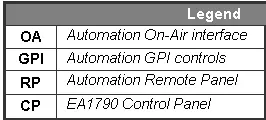 Legend