81.1 Promo Manager
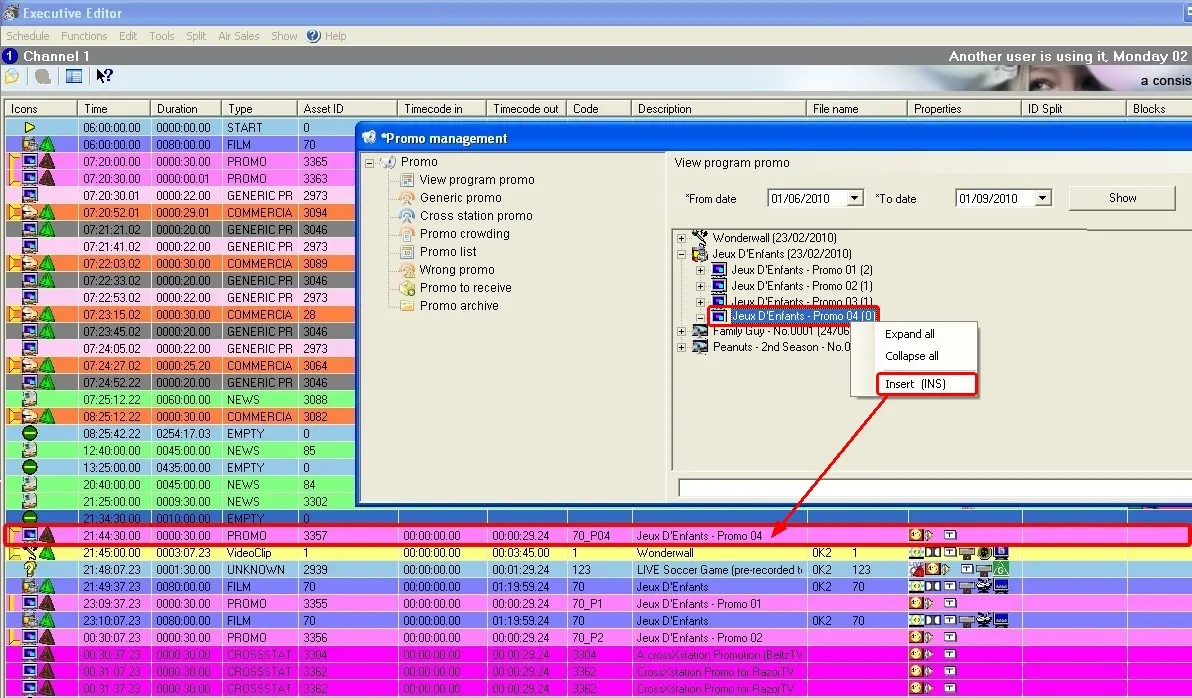
Besides automatically placing promos using the "Promo Scheduler" tool, Etere also allows manually inserting them from the "Promo Manager" (view program promo, generic promo, cross-station promo, etc.) into the currently open Executive Editor/Strategic Editor schedule, just by performing any of the following actions:
4837_Promo_Manager
1. Make right-click on the promo and select the 'Insert' option.
When inserting promo to schedule, there are 3 options for insertion:
- Insert: Insert the promo into the currently opened schedule.
- Insert top: insert promo to the top of the schedule.
- Insert bottom: insert promo at the end of the schedule.
2. Click over the promo and press the 'Ins' (insertion) key, or
3. Select the promo and drag and drop it into the schedule.
4. Once insertion actions are performed, the result will be the same; the promo will be scheduled into the currently open schedule.
5. You can insert more than one promo into the schedule.
Please note that promotions must be scheduled immediately before the program to which they are related. Otherwise, they will be listed in the "Wrong Promos" section.
NB: To be available for scheduling, promos must be valid for the selected date, time and weekday; that is, their expiry date and allowed-day properties must be satisfied (see the Asset Rights Management section of the Media Library chapter).
Note: A warning message will be prompted if you attempt to schedule the already-presented promo to the same segment.
Modify scheduled promos in Executive Editor.
The scheduled promos inserted from the Promo Manager in the current workstation can be viewed in Executive Editor. For easy reference, when the scheduled promo is published and re-opened for modification, the ladder of the modified promo will be displayed in red in the Executive Editor view. In contrast, the unchanged scheduled promos remain in blue. Refer to the Schedule View chapter in Executive Editor for more information.
For Sponsored CEE Promo, the promos that exceed the limitation of 3 promos would be displayed in black/bold font with a violet background in Promo View for crowding.
 Promo_Manager