69.1.1.17 XML
Export Scope
The F90 - XML export, extracts all previously selected events and its most relevant properties.
NB: When export is in progress, you can terminate the export with the “Stop” button. The “Stop” command would not interfere with the running export process. Instead, subsequent import/export processes would not be triggered automatically when the current export process ends.
Export Parameters
To activate any of these functions you need to configure the following parameters:
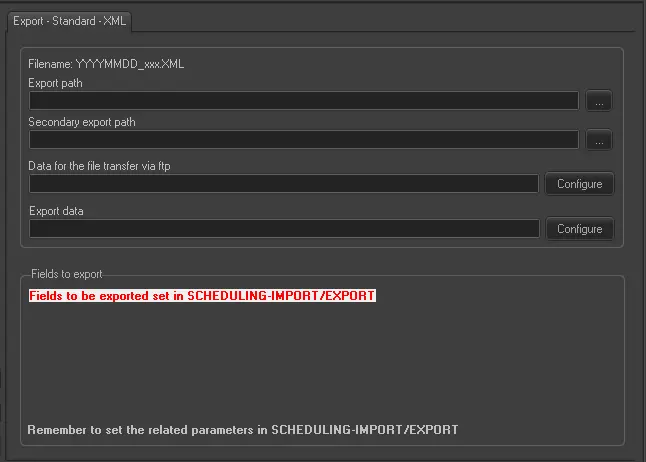
Export - Standard - XML
Filename - The exported file name is YYYYMMDD_xxx.xml
Export Path (leave it blank to not export it) - This parameter is required only if you intend to save the xml file to a folder on a computer in your network.
This path must coincide with the path set in Etere Scheduling > Import/Export.
Secondary export path - This parameter allows to export the same xml file to a secondary location. This parameter is useful for distribution of exported xml file to an alternate site, e.g. the DR site for disaster recovery purposes.
Data for the file transfer via FTP - Click on the Configure button and define the FTP parameters as described in Configure Data File Transfer via FTP chapter.
Export data - Opens the Configure Export window to specify the days that would be exported and the frequency they would be exported.
Do not forget to APPLY the changes once you have configured this function.
Scheduling related export
To conform the export in the subject with the related one in Etere Scheduling and to export secondary events, it is necessary to set up the parameters and fields to export in Etere Scheduling - IMPORT/EXPORT - EXPORT/STANDARD/GENERIC/XML
F90 parameters conversion
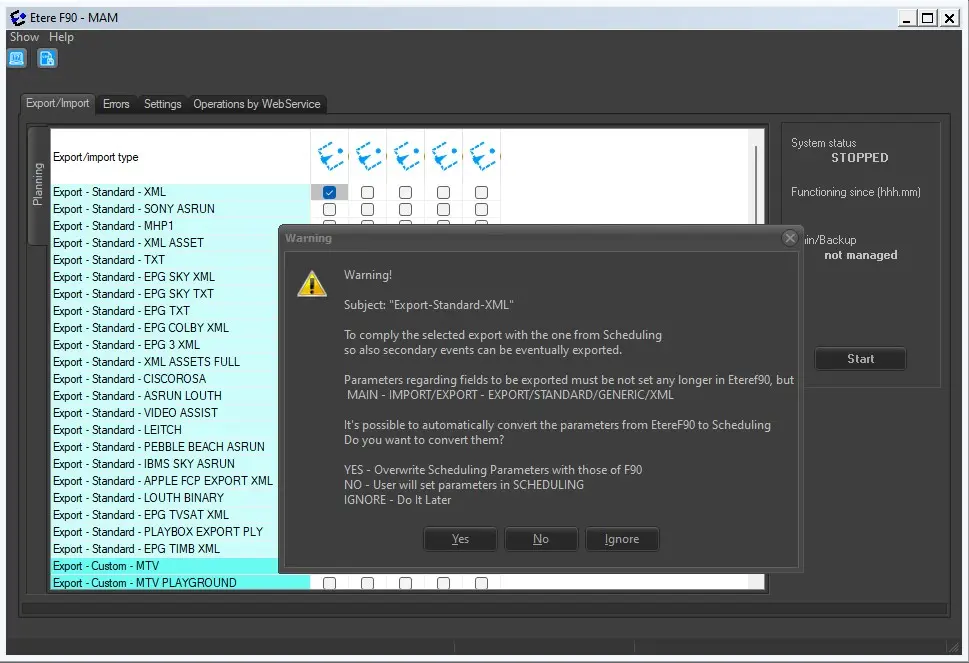
It is possible to automatically convert the parameters set up in Etere F90 to the related parameters in Etere Scheduling.
F90_parameters_convertion
Options:
YES - The parameters in the Etere Scheduling would be overwritten by Eteref90 parameters.
NO - The user needs to set up the parameters in the Etere Scheduling.
IGNORE - Leave everything as it is and ignore this option.
 Export_-_Standard_-_XML
 F90_parameters_convertion