84.2.4.24 Video Over
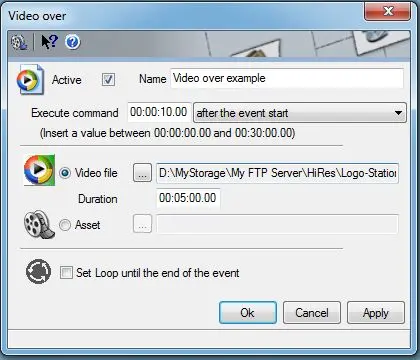
The Video Over secondary event allows to overlay a certain video over the main event to which it is associated. Parameters required to for this secondary event are:
•Active: Tick off this parameter to enable the secondary event, leave it unchecked to disable it,
•Name: Give it a brief descriptive name,
•Icon: Make double-click on the default icon to change it with a more suitable one,
•Execute command: Set the time at which the secondary event will start, possible values are:
➢after the event start (SOM),
➢before the event start (SOM),
➢before the event end (EOM),
➢after the event end (EOM).
•Video File: If the video file is selected, it will be possible to browse for locally/network stored video files (i.e.: wmv, avi, etc) as well as define its duration,
•Asset: Use it instead of the 'Video File' option if it is intended to use an video/file belonging to an asset already existing in the system,
•Set loop until the end of the event: If this parameter is enabled, the video will last till the end of the main event, otherwise (not checked) the video will last only for its duration.
Note
In case the asset assigned for being overlaid to the primary event is not available (i.e. not yet recorded or archived) a warning will be displayed in the playlist's icons column to warn the operator about this issue.
Moreover, archived media will be automatically restored -as for primary events- by Etere Aligner.
Toolbar
In the top part of the window is positioned a toolbar containing some key functions for improving the management of secondary events:
Function: Media Library [F7]
Description: Open the Media Library, loading the asset related to the primary event for which the secondary event is being defined.
 4991_Video_Over
 4992_Execute_command