59.2.40.20 Etere.Toc104.exe
Etere.Toc104.exe is a custom program created by Etere to control GV (Grass Valley) SCTE 104 inserter via RS 422 communication protocol; it is a single program developed to manage multiple channels. The program can reside in the Main or Backup machine connecting to the SCTE 104 inserter. When the SCTE 104 inserter is started, the signal is generated simultaneously from the Main and Backup stations and inserted into 2 independent chains to cater for switching between the Main and Backup inserter.
Etere.Toc104
When Etere.Toc104.exe is activated, the communication protocol captures the exchanged information in two tabs: the Commands and Stations.
Commands tab
SCTE_Commands_tab
All SCTE 104 commands sent to the inserter are captured in the Commands tab. The following information is useful for analysis and investigation purposes:
• The station name where the commands are issued.
• The time when the Start command is issued.
• The time when the Stop command is issued.
• The duration between the Start and Stop commands.
• The recorded time for Preset and Take command.
• The event description and its assigned event ID.
• The commands issued across different dates (after "23:59:59:59")
Note: Under normal circumstances, for SCTE 104 inserter to function properly, 2 consecutive "Preset" or "Take" commands must not be received. When receiving the response from the SCTE inserter, the timeout is set at 2 seconds.
Stations tab
SCTE_Stations_tab
The general information captured in the Stations tab is divided into the following sections:
• Logs: It displays the last operations executed from the respective stations.
• Data received from SYNC-SRV: It displays a list of items received from Imagine via UDP.
• Schedule read from TvScheduler: It displays the schedules extracted from the database.
• Commands to send to Grass Valley SCTE Inserter: Commands to be sent to the inserter are displayed in this section.
Configuration Parameters
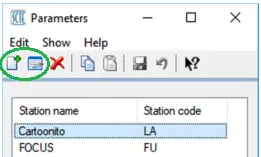
You can configure the Stations to be included in the program by clicking on the Parameters icon.
Parameters_icon
You can add a new Station in the Parameters dialogue or edit the existing Stations.
Parameters
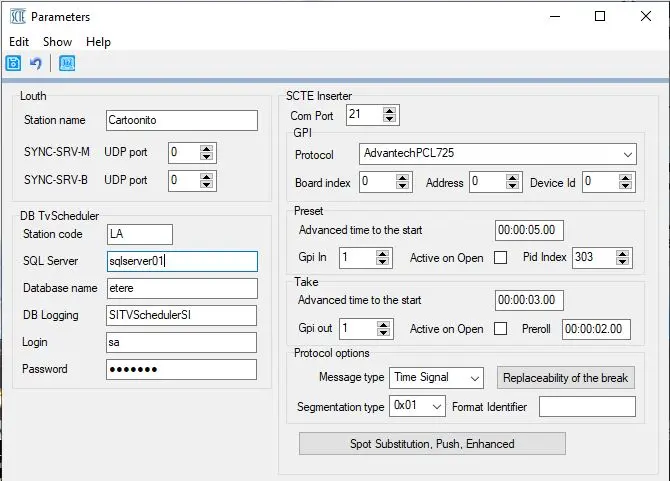
You would need to fulfil the parameters below when adding a new Station or editing existing Stations.
SCTE_Inserter_new
• The parameters on the left panel are self-explanatory.
• For the required parameters in the SCTE Inserter section on the right panel, you can refer to chapter 59.2.40.18 Advanced Settings.
Upon configuration, the above configuration would be written to file "Etere.Toc104.xml” in the local path "C:\Users\Username\AppData\Local\Etere”.
Note: In the Main and Clone setup environment, the GPI card address is configured as "0” or "1” (or vice versa) in both servers; the address corresponds to the offset in bytes of the GPI read on the AdvanTech card, where offset "0” use the GPI 0 -7 of the card, and offset "1” use GPI 8 – 15 of the card.
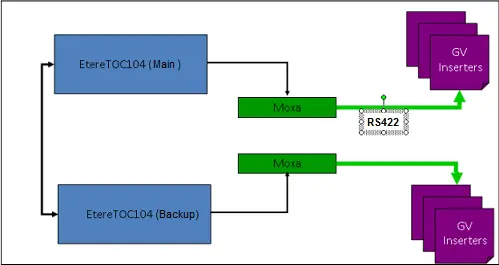 Etere.Toc104
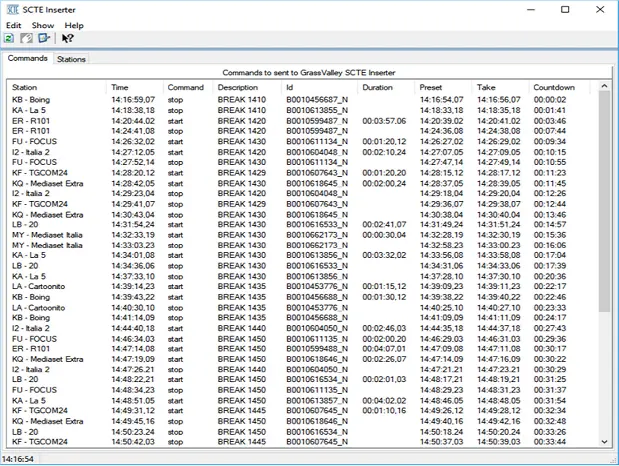 SCTE_Commands_tab
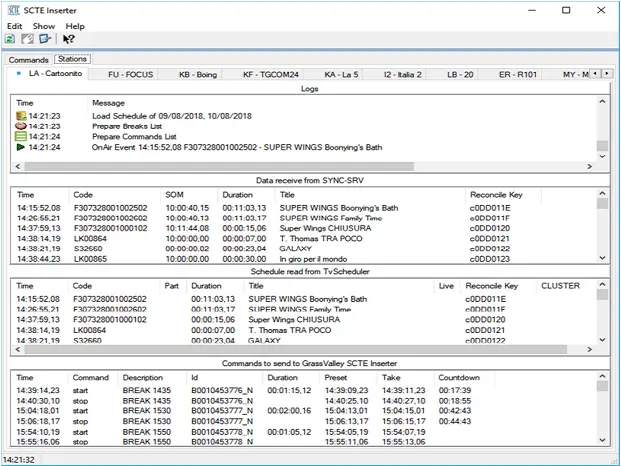 SCTE_Stations_tab
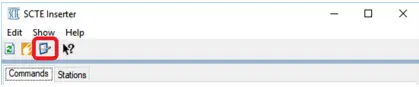 Parameters_icon
 Parameters
 scte_inserter_new