72.7.3.2 ETX closed captions server
ETX Closed Captions Server Overview
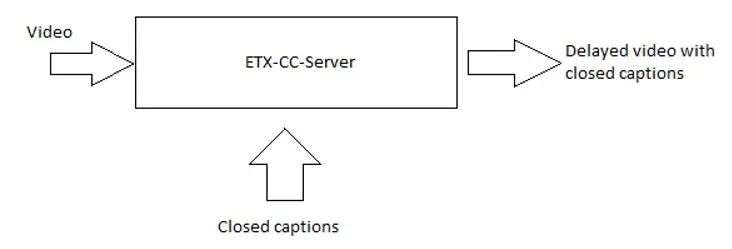
Etere introduced ETX Closed Captions Server (ETX-CC-Server) to manage the insertion of closed captions subtitles on a video input. The following diagram illustrate the flow of the closed captions deployment on video via the Closed Captions Server:
ETX-CC-Server 1
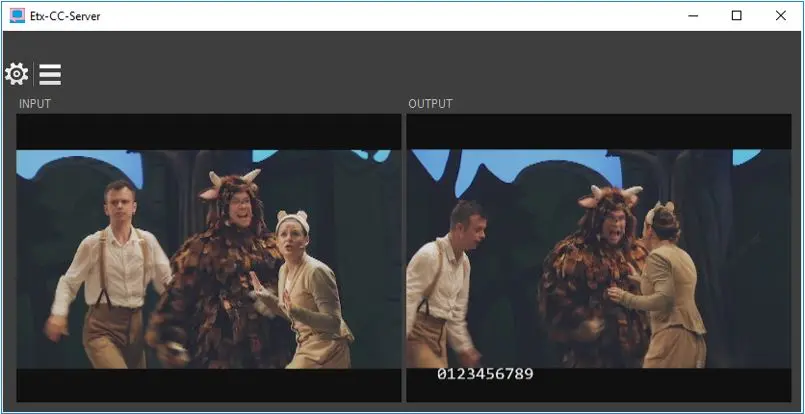
After login to the server, an overview of the closed captions main screen appears:
ETX-CC-Server
-The Settings icon enable to configure and setup the closed captions subtitle system.
-The Functionality Test icon enable you to test the input of closed captions subtitle and view the output results.
-The INPUT screen on the left panel monitor the incoming video. If the incoming video contain closed captions subtitle, the closed captions would be display on the input screen. It can also receive subtitle inserted through the protocol used for MTX / ETX logo.
-The OUTPUT monitor screen on the right panel display the closed captions subtitle inserted into the video.
The ETX Closed Captions Server used CEA608 and CEA708 captions standard (see descriptions below) to insert closed captions, it use a template in ETX CG Editor and used only this template to display closed captions. When a closed captions file (*.ml-cgc) is uploaded to ETX Closed Captions Server, the Closed Captions Server display the closed captions defined by the “mi-cgc” template, you cannot change the settings in the closed captions file using the Subtitles Tool in ETX Closed Captions Server.
ETX Closed Captions Server support 2 standards of closed captions for broadcasting:
1.CEA-608 VBI (Vertical Blanking Interval) Line 21 captions for analog television in NTSC System.
CEA-608 can be embedded in digital television, it supports up to 2 languages at a time. The closed captions is transmitted on Line 21 data area of the analog signal and viewable with a decoder.
The captions appearance: black box backgrounds with all uppercase white text, the captions displays at a fixed position on the screen.
Transmission: CEA-608 captions can be transmit on analog and digital television.
2.CEA-708 closed captions for digital television.
Digital television also support CEA-708 standard. For SD digital television, it used VBI Line 21 CEA-608 standard, for HD digital television, it used VANC Line 9 CEA-708 standard to support multiple languages captions.
The captions appearance: support 8 font options, 3 text sizes, 64 text colours, 64 background colours. The position of the captions do not have to be fixed.
Transmission: CEA-708 captions is only possible to transmit on digital television.
ETX Closed Captions Server Settings
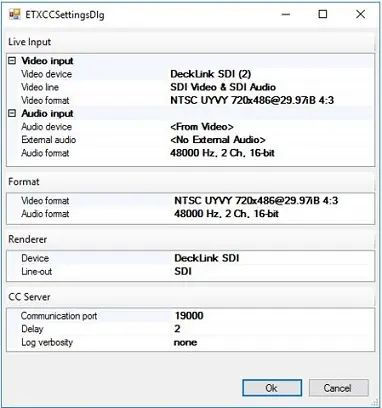
Below is the configuration settings on ETX Closed Captions Server, click the Settings icon from the Closed Captions Server main page to lunch the configuration settings:
ETX-CC-Server
There are few points to note when configure the server during the server startup.
ETX-CC-Settings
•Live Input
oSelect video input (includes input device, input line and input format)
oSelect audio input (include input device, input format, external audio (if any))
•Format
oSelect video output format
oSelect audio output format
•Renderer
oDevice: Select the device used for closed captions subtitle
oLine-out: Select the interface used by the renderer device
•CC Server
oCommunication port: specify the TCP/IP port where closed captions application receives subtitles submitted by external clients.
oDelay: specify the delay in second between video / audio input and output.
oLog verbosity: it allow selection of log verbosity level to capture the log messages.
•Miscellaneous
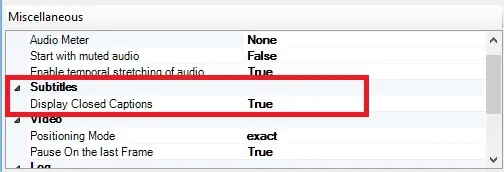
Display closed captions
Subtitles:
- Display Closed Captions: Set this parameter to “True” in order to manage the display of CEA-608 or CEA-708 closed captions in the Preview window. If set to “False”, no subtitles would be displayed.
Upon configured, a folder named “Etere_pte_ltd” would be created in user specific “AppData\Local” folder where the configured settings are stored.
Functionality Test
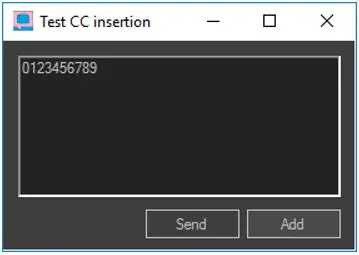
The Functionality icon on the Closed Captions Server enable you to carry out functional test while inserting subtitle and displaying the subtitle on the OUTPUT monitor screen.
Click the icon to launch the test menu.
Test CC inserction
-Use the “Add” button to directly insert closed captions from the server onto the video.
-Use the “Send” button send the closed captions as a client to the server, the closed captions text would be received by the executable as it was sent by a remote client using ETX logo protocol and inserted onto video output.
Main / Backup Closed Captions Server
Main & Backup Closed Captions Server
 ETX-CC-Server_3
 ETX-CC-Server_2
 Display_closed_captions
 ETX-CC-Settings
 ETX-CC-Server_1
 Test_CC_inserction
 Main_&_Backup_Closed_Captions_Server
 Executive_Editor
 Media_Library
 Subtitles