69.1.1.16 VIDEO ASSIST
Export Scope
The F90 - Video Assist export creates a scheduled snapshot from the central Etere database into an implemented Video Assist database. After launching, it would execute a 'cleanup' command every 'X' hours for the Video Assist database and delete all schedules older than two days and all inconsistent assets and video files.
Each time Etere F90 exports a new snapshot, it will keep only the last ten recent snapshots, reducing the number of old useless snapshots in the database and speeding up the periodical cleanup operation.
Note:
For detailed information on the Video Assist feature, please refer to the chapter describing how to use the option in the Etere Configuration > Settings > Executive Editor > Schedule Parameters > Video Assist section.
Export Parameters
This export required the following parameters to be set:
Export - Standard - VIDEO ASSIST
Export Path (leave it blank, not export it) - This parameter only indicates if the export can be performed (i.e., the existing path specified). When empty, the export would not start.
Days ahead regarding the selected day to be exported - Indicate the number of daily schedules to be exported each time the export is launched.
How often (in hours) should the cleanup be performed? Indicate the time interval between the cleanup operations. Delete operations include:
▪ Schedules: Delete all schedules older than two days.
▪ Assets: Delete assets existing in the Video Assist database but not in the Main database.
▪ Files: Delete files -via workflow- related to files no longer scheduled on future schedules.
NB: The cleanup operation doesn't delete assets inserted in the Jingle Cartwall nor created directly in the Video Assist server.
Export data - Opens the Configure Export window to specify the days to be exported and the export frequency.
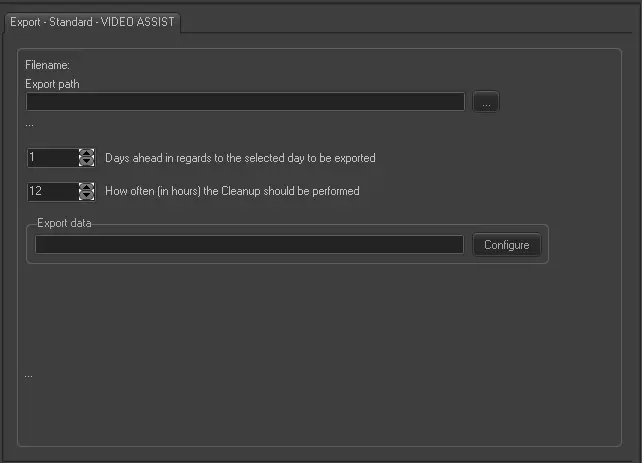 Export_-_Standard_-_VIDEO_ASSIST