74.5.1.3 ENPS - How to create an Object
At the end of the configuration, it's possible to use the ENPS client for creating objects in Etere's database. These are the operations to do:
Using ENPS 4.5
•Start ENPS client,
•Select ENPS logic unit, choose "Location", "Server", "Program name". All objects included in the Program will be displayed, and the ENPS logic unit will change with the name of the chosen Program,
•Select the chosen Program, then "New, RunDown." Insert a title for the new RunDown, select "MOS Control Active," then "Go":
'This is how to send the Rundown to Etere MOS Gateway.'
•The ENPS client will show a new form for the RunDown creation. Open the cascade menu with the right mouse button, select "Insert row," then click twice to open the story's creation form,
•Open the cascade menu with the right mouse and select "MOS Commands." The entry corresponding to Etere NCRS OCX will appear inside:
•Select the entry corresponding to Etere NCRS OCX and insert the following data:
- On ENPS PARAMETERS, fill the same settings set on Mos Gateway-MOM Object-Restore Archived Files.
- On Settings-System, set the Name/IP of Etere SQL Server, Name of Etere SQL database, Authentication mode if SQL set user and password for SQL login.
Using ENPS 5.0
To Open the OCX in ENPS, click on the World icon.
•After inserting all data, the Etere NCRS OCX component that allows one to access the Etere database will be executed.
 Mosgate_enps5
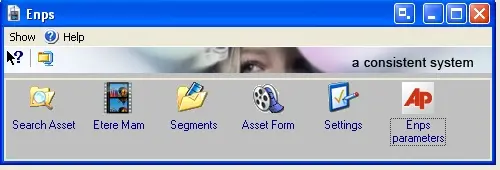 Mosgate_enpsparameters
 Mosgate_moscommand