1.5.2 Reporting Service
a reporting server is a centralized, server-based application that creates, manages, and delivers various reports. In this chapter we will cover the installation of BIRT (Businness Intelligence Reporting Tool)
1. Install prerequisites
bash console
sudo apt install -y tomcat10 default-jdk curl
```

### 2. Download BIRT 4.23.0 runtime
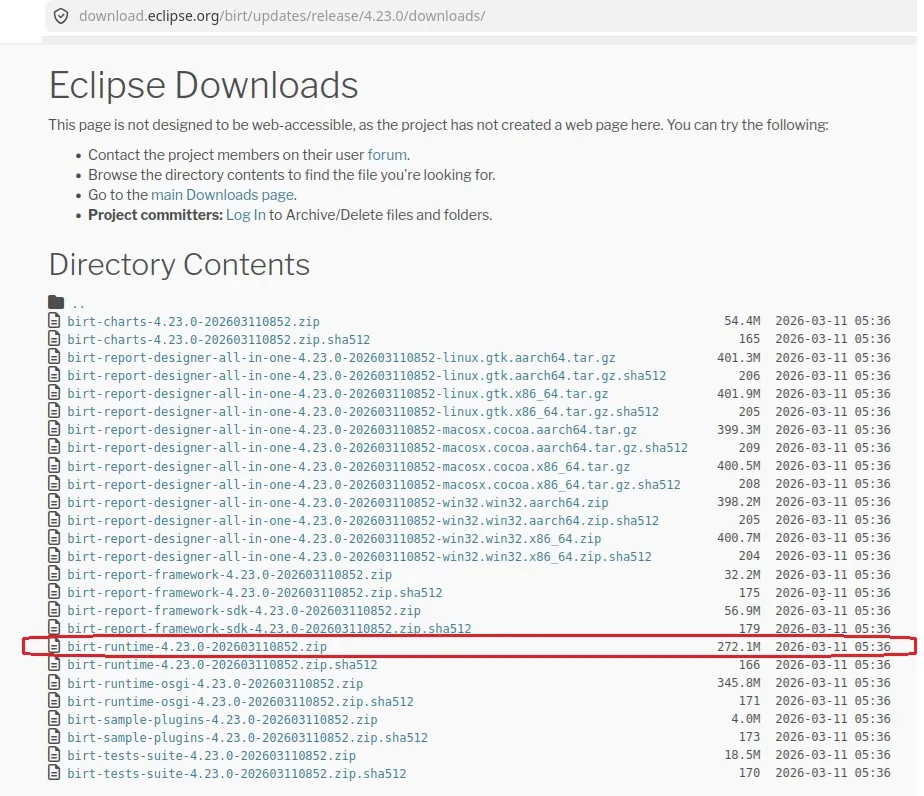
Download manually from browser (wget redirects to HTML):
```
https://download.eclipse.org/birt/updates/release/4.23.0/downloads/
see image: ubuntu_BIRT_downloadSave the zip to /home/sis/Downloads/birt-runtime-4.23.0-*.zip
3. Download JDBC driver for SQL Server
bash console
wget "https://repo1.maven.org/maven2/com/microsoft/sqlserver/mssql-jdbc/12.6.1.jre11/mssql-jdbc-12.6.1.jre11.jar" \ -O mssql-jdbc.jar
4. Download Jakarta migration tool
bash console
wget "https://repo1.maven.org/maven2/org/apache/tomcat/jakartaee-migration/1.0.8/jakartaee-migration-1.0.8-shaded.jar" \ -O jakartaee-migration.jar
5. Migrate javax → jakarta and repackage as WAR
bash console
# Run migration
java -jar jakartaee-migration.jar \
  ~/Downloads/birt-runtime-4.23.0-*.zip \
  ~/birt-jakarta.war

# Extract only the WebViewerExample webapp folder
mkdir -p ~/birt-war-tmp
unzip -q ~/birt-jakarta.war "WebViewerExample/*" -d ~/birt-war-tmp/
mv ~/birt-war-tmp/WebViewerExample/* ~/birt-war-tmp/
rmdir ~/birt-war-tmp/WebViewerExample

# Verify structure — must show WEB-INF, webcontent, report, etc.
ls ~/birt-war-tmp/

# Add JDBC driver
cp ~/mssql-jdbc.jar ~/birt-war-tmp/WEB-INF/lib/

# Repackage as WAR
jar cf ~/birt-final.war -C ~/birt-war-tmp .
6. Deploy to Tomcat
bash console
sudo systemctl stop tomcat10
sudo rm -rf /var/lib/tomcat10/webapps/birt /var/lib/tomcat10/webapps/birt.war
sudo cp ~/birt-final.war /var/lib/tomcat10/webapps/birt.war
sudo systemctl start tomcat10
sleep 20
7. VerifY
bash console
curl -s "http://localhost:8080/birt/output?__report=example_simple.rptdesign&__format=html" \
  -o /tmp/test.html
echo "Size: $(ls -lh /tmp/test.html | awk '{print $5}')"
# Should be ~55K with no errors
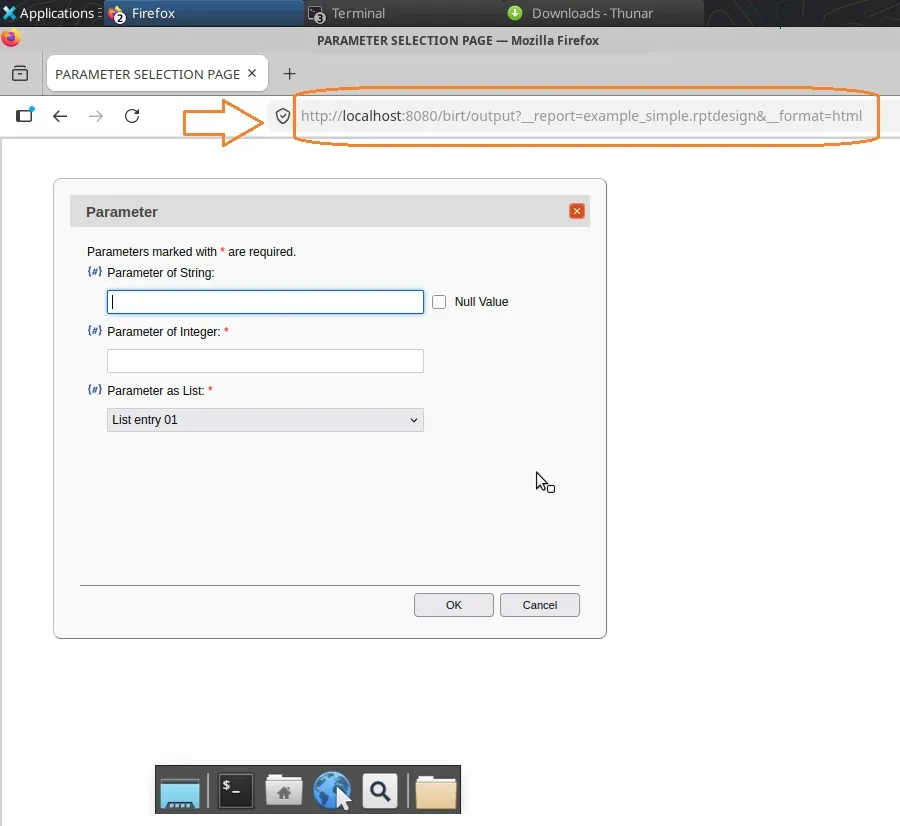
note: BIRT reports must be of the same version of the BIRT serverTo check that the BIRT installation was successful, open a web browser such as Firefox, type the following link: http://localhost:8080/birt/output?__report=example_simple.rptdesign&__format=htmland see that the sample report opens
see image: ubuntu_BIRT_02
NOTE: You can find more documentation on Birt Viewer home page http://localhost:8080/birt/
8. Use within Etere web
in order to let Etereweb load BIRT reports, open Etere web web.config file in C:\inetpub\wwwroot\Etereweb and add
this key<add key="BIRT_URL" value="http://your.ip.to.birt:8080/birt/" />under <appSettings> tag, and reload EtereWeb on IIS web server.9. Integrate fonts
This BIRT runtime does not use the classic exploded-plugin layout (there is no org.eclipse.birt.report.engine.fonts_*.jar). Instead, all four fontsConfig*.xml files are packed at the root of the main runtime jar:
/var/lib/tomcat10/webapps/birt/WEB-INF/lib/
org.eclipse.birt.runtime_4.23.0-202603110852.jar
├── fontsConfig.xml
├── fontsConfig_linux.xml
├── fontsConfig_pdf.xml <-- edit this one
└── fontsConfig_win32.xml
Because these are jar entries, not files on disk, any edit requires: extract → modify → repack into the same jar.9.1 Procedure — editing fontsConfig_pdf.xml
9.1.1 Back up the jar
sudo su -
cd /var/lib/tomcat10/webapps/birt/WEB-INF/lib/
cp org.eclipse.birt.runtime_4.23.0-202603110852.jar \
org.eclipse.birt.runtime_4.23.0-202603110852.jar.bak
9.1.2 Extract the current config files
mkdir -p /tmp/birt-fonts-work
cd /tmp/birt-fonts-work
unzip -j /var/lib/tomcat10/webapps/birt/WEB-INF/lib/org.eclipse.birt.runtime_4.23.0-202603110852.jar \
fontsConfig.xml fontsConfig_pdf.xml fontsConfig_linux.xml fontsConfig_win32.xmlThe -j flag ("junk paths") extracts the files flat into the current directory, matching how they sit at the jar root.
9.1.3 Edit fontsConfig_pdf.xml
a working xml configuration for Liberation Sans is as follows:
<?xml version="1.0" encoding="UTF-8"?>
<font>
<font-paths>
<path path="/usr/share/fonts/truetype/liberation" />
</font-paths>
<font-aliases>
<mapping name="serif" font-family="Times-Roman" />
<mapping name="sans-serif" font-family="Helvetica" />
<mapping name="monospace" font-family="Courier" />
<mapping name="Arial" font-family="Liberation Sans" />
</font-aliases>
<font-encodings>
<encoding font-family="Times-Roman" encoding="Cp1252" />
<encoding font-family="Helvetica" encoding="Cp1252" />
<encoding font-family="Courier" encoding="Cp1252" />
<encoding font-family="Liberation Sans" encoding="Cp1252" />
<encoding font-family="STSong-Light" encoding="UniGB-UCS2-H" />
<encoding font-family="MSung-Light" encoding="UniCNS-UCS2-H" />
<encoding font-family="HeiseiKakuGo-W5" encoding="UniJIS-UCS2-H" />
<encoding font-family="HYGoThic-Medium" encoding="UniKS-UCS2-H" />
</font-encodings>
<composite-font name="all-fonts">
<font font-family="Liberation Sans" catalog="Western" embed="true" />
<font font-family="STSong-Light" catalog="Chinese_S" />
<font font-family="MSung-Light" catalog="Chinese_T" />
<font font-family="HeiseiKakuGo-W5" catalog="Japanese" />
<font font-family="HYGoThic-Medium" catalog="Korean" />
</composite-font>
</font>
9.1.4 What each section does
• font-paths: tells the PDF engine where to look for physical TrueType font files on disk — must point to a directory containing the Liberation Sans .ttf files.
• font-aliases: the actual substitution rule. The entry mapping Arial to Liberation Sans is what redirects any report design using Arial to render with Liberation Sans in PDF output.
• font-encodings: sets the character encoding used per font family. Cp1252 covers Western European accented characters (à, è, ì, ò, ù) used in Italian text.
• composite-font "all-fonts": defines the default font used when no specific mapping applies, and sets embed="true" so Liberation Sans is embedded directly in the generated PDF rather than relying on fonts being present on the machine that opens the PDF.
9.1.5 Verifying the font files exist
The font-paths entry and embed="true" only work if the actual .ttf files are present at that path. Confirm with:
ls -la /usr/share/fonts/truetype/liberation/the following Liberation Sans weights must be present in order to be taken from Birt:
• LiberationSans-Regular.ttf
• LiberationSans-Bold.ttf
• LiberationSans-Italic.ttf
• LiberationSans-BoldItalic.ttf
BIRT's font engine automatically picks up bold/italic variants by filename convention within the family folder — no separate alias entries are needed for each style as long as all four files are present.
9.1.6 Repacking the jar
After editing fontsConfig_pdf.xml, update it back into the jar from the same flat directory it was extracted to, so it lands back at the jar root rather than in a subfolder:cd /tmp/birt-fonts-work
zip -j /var/lib/tomcat10/webapps/birt/WEB-INF/lib/org.eclipse.birt.runtime_4.23.0-202603110852.jar \
fontsConfig_pdf.xmlConfirm the update took effect by checking the timestamp changed inside the jar:
unzip -l /var/lib/tomcat10/webapps/birt/WEB-INF/lib/org.eclipse.birt.runtime_4.23.0-202603110852.jar | grep -i fontsConfig
9.1.7 Restart and clear cache
systemctl stop tomcat10
rm -rf /var/lib/tomcat10/work/Catalina/localhost/birt/*
systemctl start tomcat10
Note: Font configuration is read once at BIRT engine startup, not per-request. A Tomcat restart is required after every change to fontsConfig_pdf.xml, and clearing the work/ directory avoids stale cached class/JSP artifacts masking the update.
------------------------------------ Legend
What is Tomcat?Apache Tomcat is an open-source web server and servlet container used to run Java-basedweb applications (servlets and JSPs). Developed by the Apache Software Foundation, it serves as a runtime environment for Java components, managing the application lifecycle, security, and HTTP/AJP connections.
What is BIRT software?
BIRT Project
The Business Intelligence and Reporting Tools (BIRT) Project is an open source software projectthat provides reporting and business intelligence capabilities for rich client and web applications, especially those based on Java and Java EE.
 ubuntu_BIRT_download
 ubuntu_BIRT_02