87.1.3.4 Loan Data
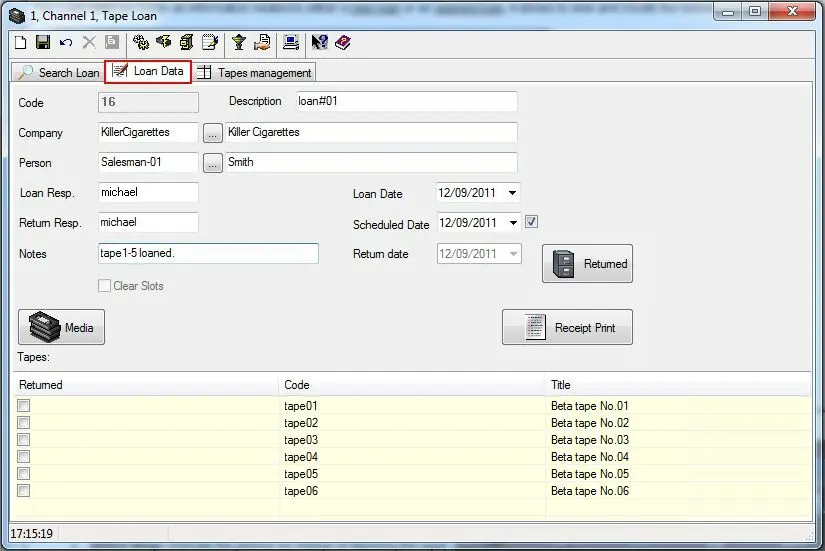
The Loan Data tab allows operators to consult open loans and compile new loans as well as returning due tapes to be returned tapes. This section is mainly formed by the following data:
Sched_tape_loan
Loan Information
Field - Code
Description : It is a number automatically generated and it can not be modified.
Field - Description
Description : Insert a brief text detailing the loan's main information.
Field - Company
Description : Contact (company) to which the tape(s) are being loaned.
Field - Person
Description : Contact (person) to which the tape(s) are being loaned.
In case a company has been previously selected, here will be displayed only those contacts (persons) associated to that company under its Personal data > Contacts section.
Field - Loan Resp.
Description : Specify here the borrower.
Field - Return Resp.
Description : The person on charge of returning the tape (by default it's the same that the loan responsible).
Field - Notes
Description : Insert here eventual notes about the loan.
Field - Loan Date
Description : The date on which the tape(s) has been loaned.
Field - Scheduled Date
Description : The date on which the loaned tape(s) should be used (e.g. send on-air).
Field - Return date
Description : The date on which the loaned tape(s) should be returned.
NB: Please remember to [Save] all changes performed to the loan before exiting the module or opening another loan.
Loan operations
Loan a media tape
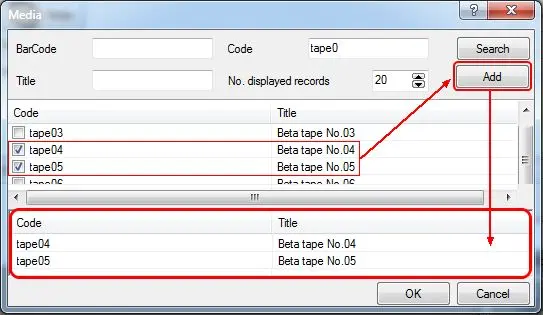
Media - The [Media] button displays a form that allows selecting the tapes to be loaned. Once opened, it will be enough to select the tapes in two different modes:
Tapeloan_loandata_03
•Barcode: Enter the barcode of the tape and press the [Enter] key, the tape will be added to the loan list.
•Code/Title: Enter the code and/or title of the tape(s) to be loaned and press the [Search] button. Select the tapes to be loaned by selecting them among the retrieved ones, then, press the [Add] button.
Please note that selected tapes can be removed from the list by making right-click on then and selecting the "delete" option.
Once the selection is complete press the [Ok] button to insert the selected tapes into the Media List (located in the bottom part of the Tape Loan tab.
Return a loaned media
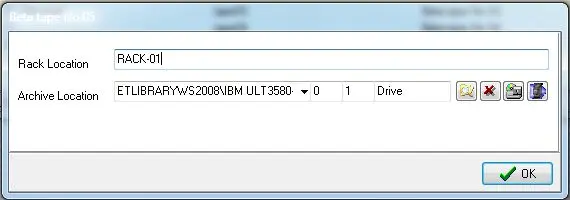
Returned - The [Returned] button is used to indicate that all tapes present in the Media list have been returned. This operation will require a confirmation and the selection of the Rack on which the tape returned tapes are located:
Tapeloan_loandata_01
Once confirmed, the current date will be automatically set as the tape's return date.
Generate a loan receipt
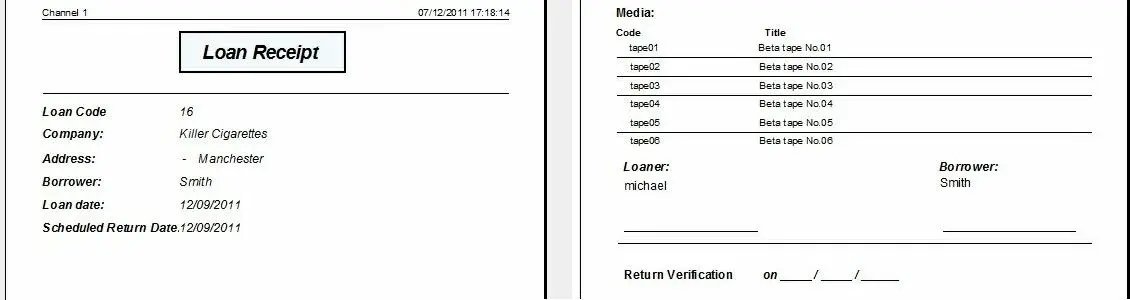
Receipt Print - The [Receipt print] allows to print a receipt containing the main information related to the current loan:
Tapeloan_loandata_02
It's worthy mentioning that the loan code contained in the report can be used to identify and search the loan at its return, allowing also the loan responsible to compile the return verification date.
 Tapeloan_loandata_03
 Sched_tape_loan
 Tapeloan_loandata_01
 Tapeloan_loandata_02