72.2.3.3 Censored Copy
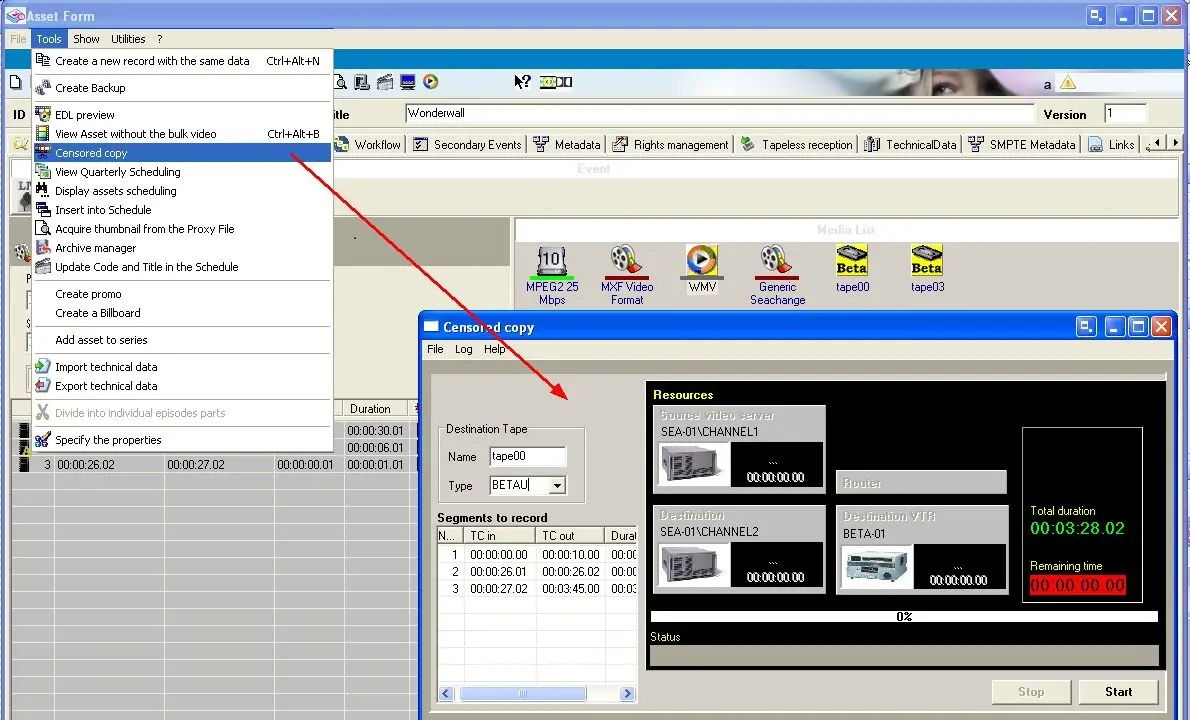
The Censored Copy function allows selecting the a new window that allows to create (ingest) a new media based on the asset's media but without video faults (marked in the EDL) or inappropriate segments (censored in the EDL).
Once launched, it will be required to select the tape on which the censored copy will be stored, then, it will be possible to start the operation.T he copy will be made on a video server and on a tape:
Censored Copy
NB: Please note that censored copies can be also created through a fully file-based operation, this, by launching a T-workflow containing a"Conform version" action.
Configure required resources
The resources to be used for the creation of a "censored copy" needs to be set under the Etere Configuration > Settings > Basic > Media Library > Resources section.
 Censored_Copy