Price List
4.4.1 New Price List
In this section, you can create a user-defined price list for specific requirements.
New_Price_List
• Description: Give a short description to define the new price list;• From date – To date: The new price list would be valid within the specified date range;
• Type: Select an event type or multiple types of events to associate with the price list. If there is no existing event type associated with the price list, this parameter would contain a NULL value, and the price list calculation remains unchanged.
• Apply to duration: Select an option to calculate the price for spot duration:
- None: The price list would be used to calculate the price for all spots without considering the duration;
- Use table only: The price list would be used to calculate the price for the events based on the duration defined in the conversion table;
- Specific value: The price list would be used to calculate the price for spots whose duration is greater than the specified value. Available duration range from 05 - 170, with an incremental of 5.
• Notes: Enter any additional description or instruction to associate with the price list.
• Default price colour: Select a colour to associate with the new price list. The default price colour assigned to the first line of the price list cannot be changed.
• Line description: Enter a line description to describe the price list. If this field is left blank, a warning message will pop up, and the new price list will not be saved when the Save button is pressed.
• Top: Pricing applies to events scheduled at the top segment of the block;
• Bottom: Pricing applies to events scheduled at the bottom.
• Priority: Pricing applies to events scheduled consistently in the same segment position;
• Rotation: Pricing applies to events scheduled across different places on a rotating basis
• Optimization: Pricing applies to events scheduled on the open position of the segment.
Click on the<Save>button to confirm the settings.
Note: From version Etere310109_BETA.zip, the newly created price list will be visible in both EtereWeb Air Sales and desktop applications.
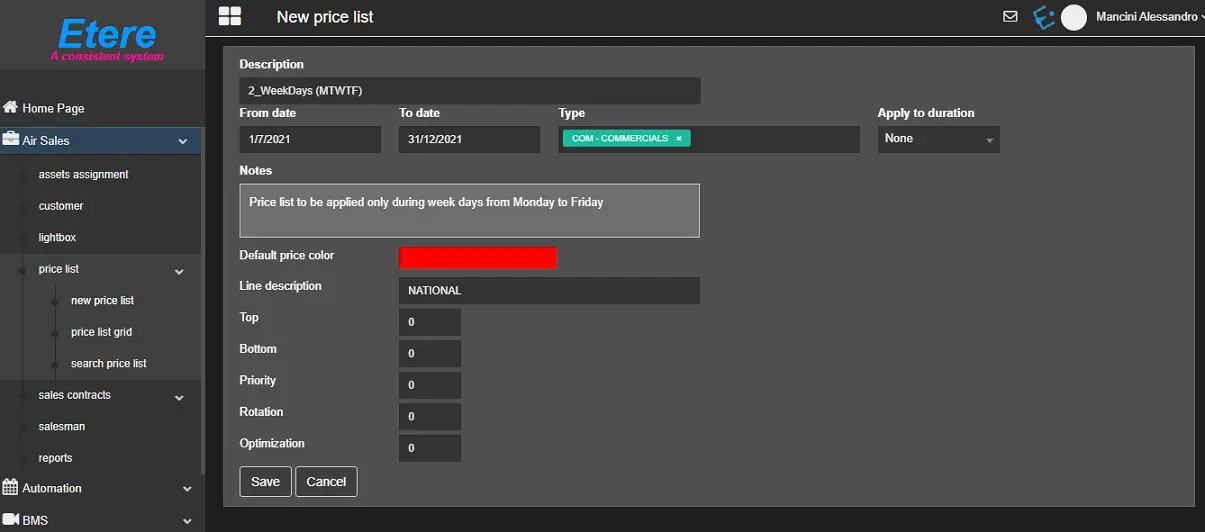 New_Price_List