59.3.9.84 Send UDP notification
Action Description
The "Send UDP notification" template allows the design custom notifications (with specific parameters) to be sent through the UDP protocol to the Notification System Console, communicating that a particular operation has been performed.
Action Parameters
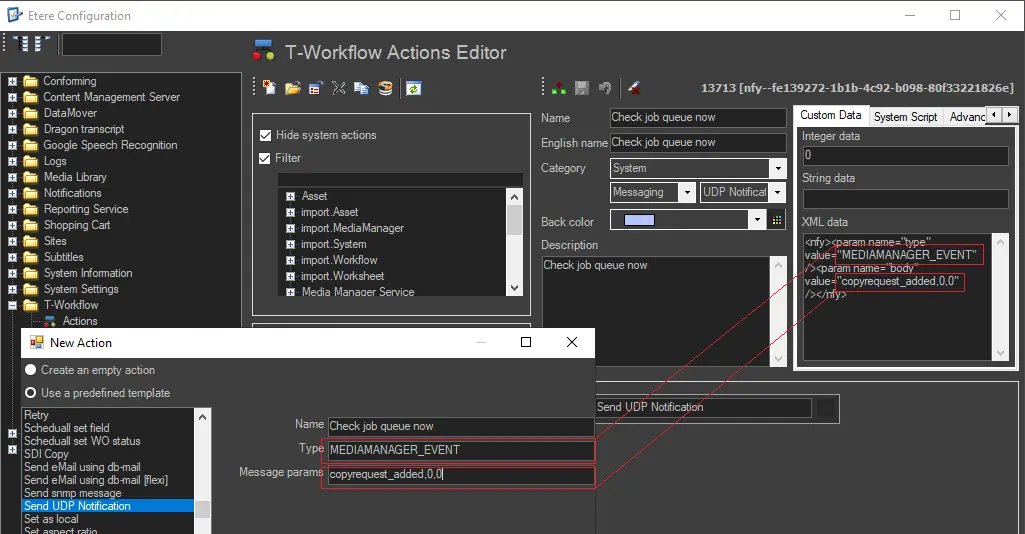
The UDP notification message could be used to send a notification manually:
3743_Send_UDP_notification
•Name: Insert a description of the template
•Type: Enter the operation type to be notified. Supported operations include:
asset_recorded - an asset media has been ingested
custom_message_1,2...9 - up to nine messages to test custom actions
lock_schedule - a broadcast playlist is locked from modifications
mediamanager_event - the data mover has performed an action
schedule_changed - a broadcast playlist has been modified
schedule_publish_accepted - a published broadcast playlist has been accepted
schedule_publish_request - a broadcast playlist has been published
schedule_saved - a broadcast playlist has been saved
tpal_modified - The automation playlist has been modified
tpal_published - The automation playlist has been published
traffic_scheduler - air sales scheduler has scheduled events
variations_import - changes have been inserted into the broadcast playlist
visca_protocol - a communication using the visca protocol
•Message parameters: Specify the "body" of the message.
How to use it
This action can be used (in the T-Workflow designer) to, for example, make Etere Data Mover send a UDP notification during media transfer every 5 minutes to check the job queue.
 3743_Send_UDP_notification