69.3.2 Select Operations
When the F90 module is launched, there are two major operational tabs:
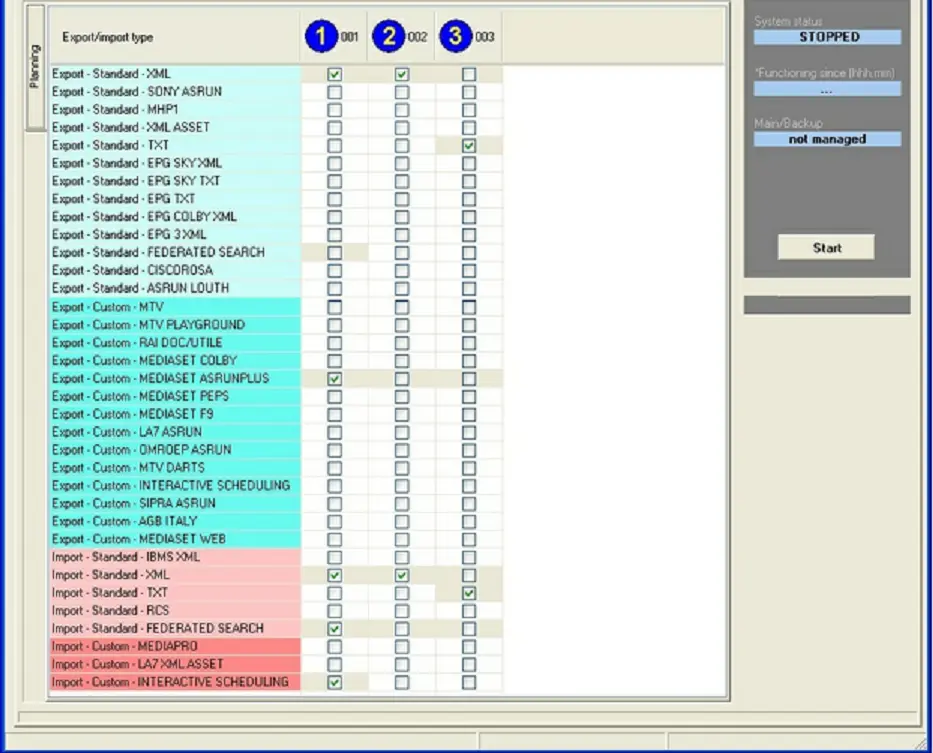
- The "Export/Import" tab allows to select all the operations intended to be performed by Etere F90.
Please note that before selecting any operation it is required to first configure its parameters (see Export/Import Parameters).
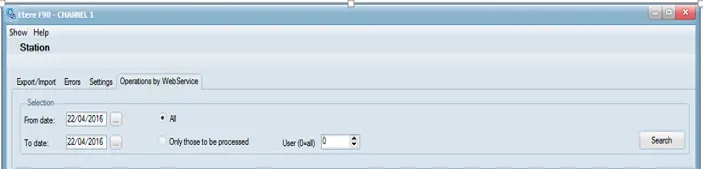
- The "Operations by WebService" tab contain all data for import by Web Services. The data can be sorted by date, import type, file name, etc.
Operations by WebService
In the Export/Import tab, the color code can be appreciated the possible state of each operation.
The status are described below:
Export-Import tab
• White box: The import/export has yet to be configured nor activated.
• Gray box: The import/export has been configured but not activated.
• Ticked Box: The import/export has been configured and activated.
• Green Box: The import/export is currently being performed.
All operations with parameters configured (displayed as a gray box) are ready to be activated, and they can be selected by double-click on them.
Once you have selected the export/import operations to be performed, you can launch them manually (last selected) or automatically (all selected), as explained in the next chapter: Starting F90.
From Etere released version 30.2 onwards, the maximum stations (issuers) allowed is set at 200 stations.
NB: You must not trigger an import/export process from the same station while the previous import/export process is in progress, it would result in conflict to the automation processes.
 Operations_by_WebService
 Export-Import_tab