Lines tabs
6.2.3.1 Main data
The Main Data tab allows you to define the most relevant parameters related to purchasing single/season program rights.
Main_Data
- Title: The description of the line.
- License start/end: Specify the licensing period covered by the purchased Order.
- Production date: Indicate the date when the program was produced.
- Type: Specify the asset type of the selected contract line. Assets linked to the line must match the type configured.
- Language: Select the language to be linked to the licensing rights. It’s usually the spoken language or subtitle of the program.
- Brief Synopsis: Insert a short description of the program.
- Unlimited rights: If enabled, the program would not have Run limitations. The program can be broadcasted a total number of times by paying a global price. The Run and ReRun parameters would be set to “0”.
- Make row available to another asset schedule: In some cases, an asset can be present in multiple Orders. If enabled, this parameter provides the Order line to Program Scheduler and Seasons Scheduler when BMS’s rights are unavailable in the scheduled used Order;
- Run no.: Specify the number of Runs assigned to the line. A Run is defined as the first broadcast performance of a program;
- ReRun no.: Specify the number of ReRuns assigned to the line. A ReRun is defined as a repeated performance of an already broadcasted program.
When all parameters are confirmed, click the <Save> button to save the settings in this tab, or click the <Save and exit> button and return to the Lines tab.
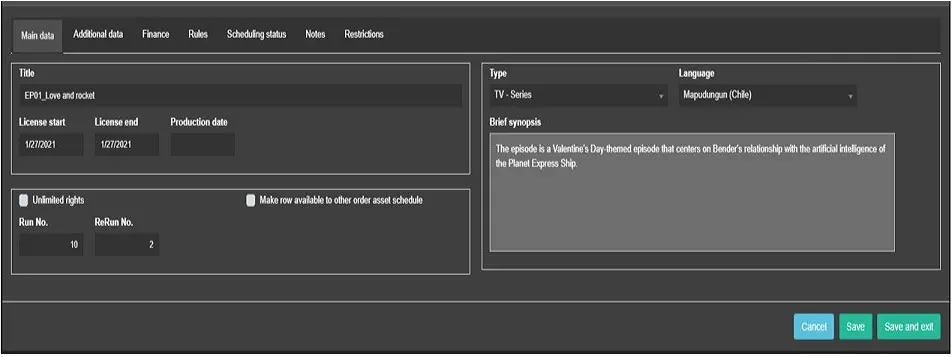 Main_Data