88.2.2 HLS tab
In HLS tab, you can configure the encoder for recording.
Etere_encoder_hls_hls
Source
Parameter - Video device
Description : Select a video device from the list.
Parameter - Video input
Description : Select a video input from the list.
Parameter - Video format
Description : Select a video format.
Parameter - Audio device
Description : Select an audio device, or leave it as <From video> to use the audio in selected video device.
Parameter - Audio format
Description : Select an audio format.
HLS Codec
Parameter - Chunk duration
Description : Set the duration for each chunk of streaming segment.
Parameter - Maximum number of chunks
Description : Set the maximum number of chunks can be divided for the data stream.
Parameter - Video codec
Description : Select the codec to be used for video.
Parameter - Audio codec
Description : Select the codec to be used for audio.
Parameter - GOP size
Description : Set the value for GOP size (0 = default, 1 = I-frames only)
Parameter - Advanced settings
Description : Define the additional settings during recording.
Parameter - HLS playlist properties
Description : Define the common tags to be written in the master “.m03u8” file during recording.
Parameter - HLS playlist properties (I-frame)
Description : Define the I-Frame management (enabled or disabled)
Parameter - Recording path
Description : Set the recording path. A sub-directory for each recorder would be created when recording starts
When all parameters are fulfilled, click the <Save> button to save the configuration settings.
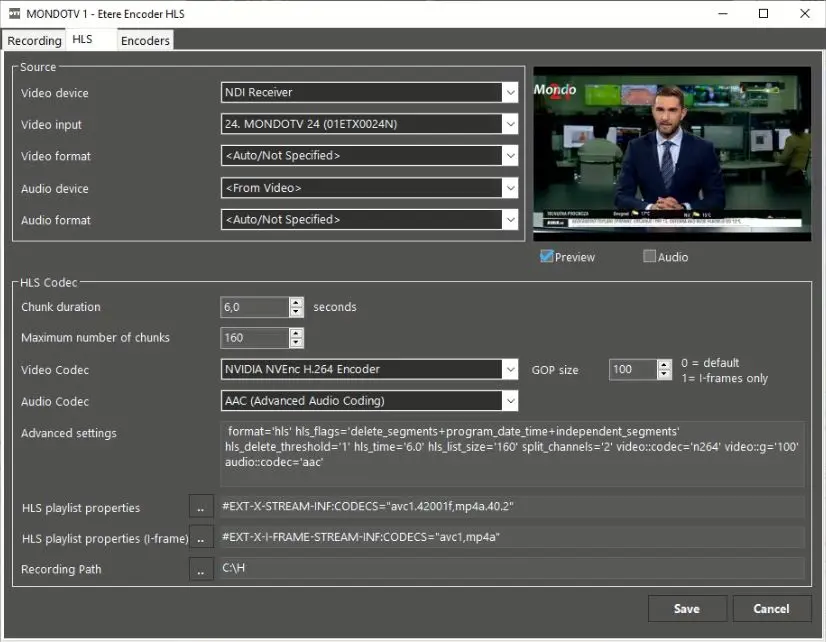 Etere_encoder_hls_hls