17.2.3 Search
If a container needs to be edited or checked, it's possible to look for it in the Search section.
Users can simply insert the container description and click the Apply filter button. A list of all the containers that match the filter will appear on the page.
eventCont_search
Every container has a progressive ID that cannot be changed, created automatically along with the container.
Each row of the table has an Actions button, which allows to perform the following operations:
- Edit: Allow to modify the container and redirect the user to the same editing page displayed during the container creation (see 17.2.1.0 New container chapter).
- Delete: Remove the selected container.
- Duplicate: Creates a new container with the same description and the same events as the selected one. The new container's description adds an asterisk (*) to let the user recognize the two entries.
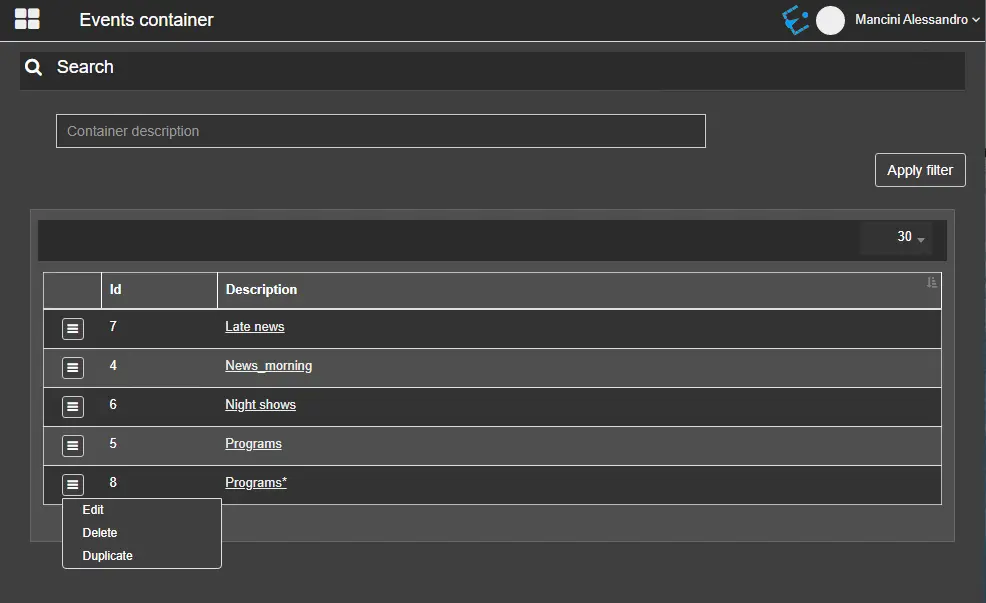 eventCont_search