84.4.4.7 STANDARD > SKY > EPG TXT
Export Scope
The SKY - EPG TXT option allows the user to export a plain-text file (.txt) containing the broadcast playlist of one more days including the EPG information related to the events scheduled on them.
Notice that this export function must be used along with Etere Air Sales, the module on which the commercial structure is created and EPG data is inserted.
Export Parameters
This procedure is divided in two main fields:
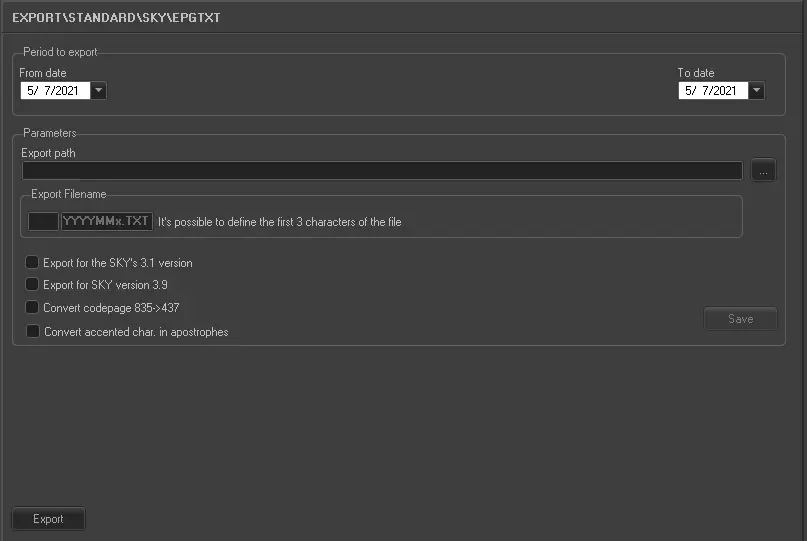
5068_Export_standard_sky_epg_txt
•Range to export
Here we can select the interval of days (from date - to date), from where the schedule will be taken.
•Parameters
In this section the user is able to select the content of the file:
•Export path: Specify the path where the file will be saved once exported.
•Export filename: The name of the exported file will have the format 'sssYYYYMMx.TXT', where:
- sss : three characters that will go at the beginning of the filename, these characters are used, for example, to indicate the station (f.e. MTV2009031.txt),
- x : a suffix that indicates if the exported file contains the scheduling of one month (a), the first half a month (b) or second half of a month (c).
•Export for the Sky's 3.1 version: It allows to export new fields related to TV seasons, introduced with the 3.1 version of SKY's specifications.
•Export for SKY version 3.9: Enable this option to export the text file applicable SKY 3.9 version.
•Convert codepage 835->437: If enabled, all characters with an ASCII code not included between 32 and 126 will be deleted.
•Convert accented characters in apostrophes: If enabled, all accented characters will be replaced with the letter plus an apostrophe. For example, the è character will be exported as e'
Important notes:-
There are limitations to the length of data on the export. Data exceed the below mentioned threshold will be truncated:
-Title: it must not exceed 120 characters
-Description: it must not exceed 75 characters
-Description + Synopsis: it must not exceed 200 characters
-Seasons Title: it must not exceed 120 characters
-Episode Title: it must not exceed 120 characters
-Identification Title: it must not exceed 12 characters
Note
Grouping multiple events as one program is possible (e.g. from Executive Editor) through the insertion of an EPGI event and an EPGO event before and after the group respectively, in this way all events in between them will be considered as one program. Each grouped program must have a specific EPGI event since its description is extracted from it whereas the duration is calculated as the sum of all grouped durations:
Simpson (duration: 00:29:14)
EPGI
Simpson (part1)
Spots break
Simpson (part2)
Spots break
Simpson (part3)
EPGO
Moreover, it's worth mentioning that EPGI and EPGO events are based on EPGI and EPGO types set in Configuration > Settings > Types.
Launch the export
Once the export has been configured, it can be started just by pressing the <Export> button.
 5068_Export_standard_sky_epg_txt