70.3.8.2 Maintenance mode
What is the Maintenance mode?
The Maintenance mode is a tool which allows operators to perform some operations regarding the manual maintenance of a tape drive, including key tape content functions including loading, unloading, restore, migration, analysis, deletion and repairing (some content might be lost).
During the "Maintenance Mode", Etere Data Pump will not process queued operations. Moreover, the "Maintenance Mode" cannot be launched while Etere Data Pump is performing an operation (however, the maintenance can be requested to be performed at the end of said operation).
Launching the Maintenance mode
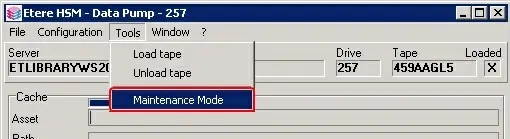
In order to launch the maintenance mode, just go to the "Tools" menu of Etere Data Pump and select the "Maintenance mode" option:
Etere HSM - Data Pump
Once the "Maintenance mode" has been launched, its main window will be displayed, this window will be composed by the following section:
Maintenance mode
Drive panel - Where all information (e.g. local device, library) and functions (e.g. load, unload, mount) managed by the Data Pump are available.
General tab - Displays all logs related to the operations (i.e. load,unload, mount) performed on the "Local Device" and "Library Drive".
Contents tab - Shows the content of the injected cartridge, exactly as stored in the Etere database.
Catalogue tab - Recatalogues the cartridge, that is, reads the cartridge content and corrects the data present in the Etere database with the actual content.
 Maintenance_mode
 Etere_HSM_-_Data_Pump