59.5.4.25 Total Orders by Week Commencing
Report Description
The Total orders by week commencing report allows the generation of a document containing all commercial events scheduled for a specific customer on weeks commencing within a given period, detailing for each event its scheduled day, scheduled time, booking code, linked asset, scheduled duration, order line and price.
Commercial events presented in this report will be grouped by order line, then by order, by the customer and finally by agency, displaying a total amount for each grouping level.
Report Filters
All the parameters that permit a detailed report generation have been spread across seven different tabs to allow a more manageable configuration. By default, all filters are disabled (i.e., either blank or unselected); to enable them, it is enough to configure at least one parameter inside. Available filters include:
•Period: Specify the period on which the start date of order lines (week commencing) should be contained.
•Agency: Specify the agency featured in the orders to be retrieved.
•Customer: Specify the customer for which the analysis will be generated.
•Order: Narrow the report to a specific booking order by entering its code or leaving it blank to retrieve all orders matching the above filters.
Report Preview
The [Settings] permits the configuration of the page layout of the outgoing document; once filters and settings have been set, it will be possible to select between displaying a preview using the related [Preview] button or printing the document directly using the [Report] button:
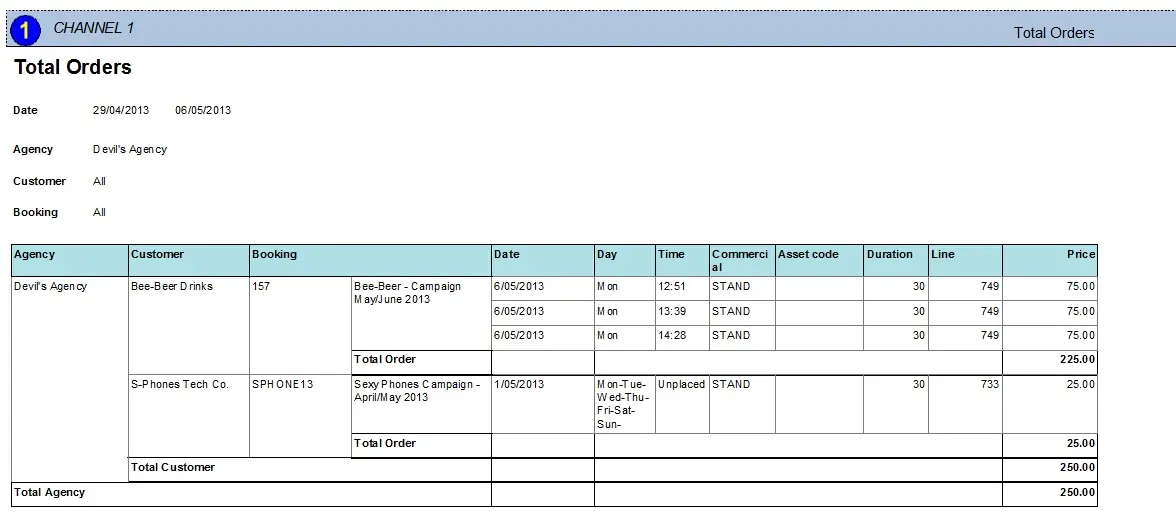
Standard report:
Total_Orders
Columns legend
Agency - The agency to which the order is related
Customer - The customer to which the order is directed
Booking - Code and description of the booking order
Date - Start date of the order line (week commencing)
Day - Weekday on which the commercial event is scheduled
Time - The time at which the commercial event is scheduled. If the event is in Black/White lists, its time will be "unplaced".
Commercial - Spot code of the scheduled commercial event
Asset code - Code of the asset linked to the scheduled commercial event
Duration - Scheduled duration of the commercial event
Line - Identification number of the order line
Price - The unit price of the scheduled commercial event
Total Order - Sum of Total W/C of all order lines (week commencing) forming part of the same order
Total Customer - Sum of all Total orders of all customers related to the same agency
Total Agency - Sum of Total customer amounts related to the same agency
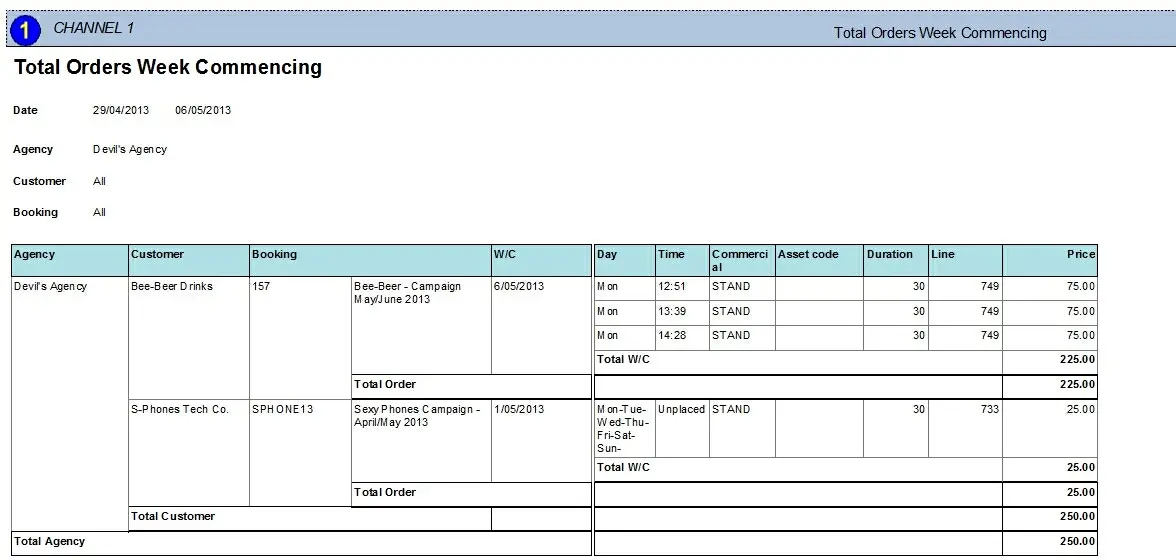
Custom report:
Total_Orders_by_Week_Commencing_preview
Columns legend
Agency - The agency to which the order is related
Customer - The customer to which the order is directed
Booking - Code and description of the booking order
W/C - Start date of the order line (week commencing)
Day - Weekday on which the commercial event is scheduled
Time - The time at which the commercial event is scheduled. If the event is in Black/White lists, its time will be "unplaced".
Commercial - Spot code of the scheduled commercial event
Asset code - Code of the asset linked to the planned commercial event
Duration - Scheduled duration of the commercial event
Line - Identification number of the order line
Price - The unit price of the scheduled commercial event
Total W/C - Sum of all prices of events derived from the same order line (week commencing)
Complete Order - Sum of Total W/C of all order lines (week beginning) forming part of the same order
Real Customer - Sum of all Total orders of all customers related to the same agency
Total Agency - Sum of Total customer amounts associated with the same agency
Please note that some reports permit the export of the generated document in the most common formats (PDF, CSV, DOC, XLS, XML, etc) just by using the [Export] button.
 Total_Orders
 Total_Orders_by_Week_Commencing_preview