84.4.4.30 STANDARD > PUBLIKOMPASS
Export Scope
The PubliKompass export feature allows exporting in plain-text format (.txt) a certain period's commercial programming in two different ways, one for advertising insertion (i.e. containing all planned commercial breaks) and another one for advertising reconciliation (i.e. containing all transmitted commercials).
Export parameters
This export allows the following parameters to be set:
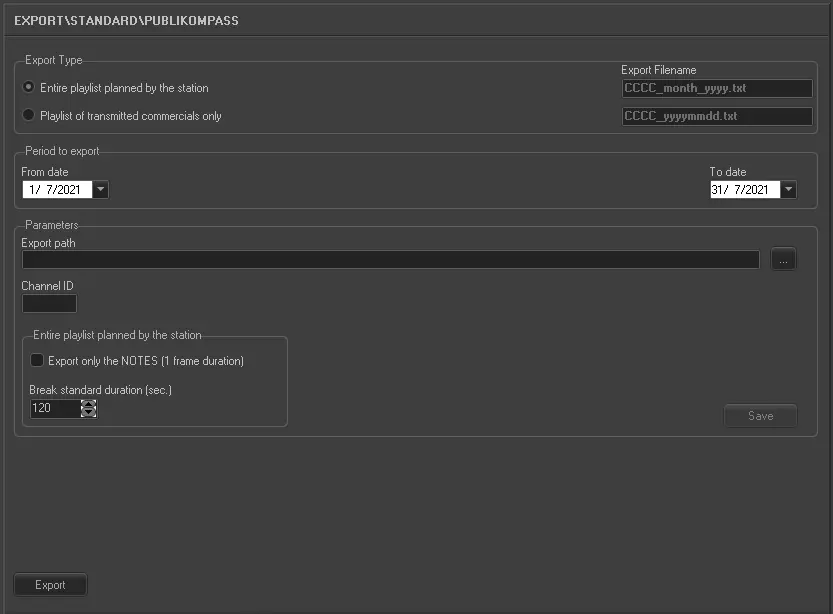
Export_standard_publikompass
•Export type: Specify the type of export to be performed, available types include:
Entire playlist planned by the station - Generates a text file for advertising insertion, that is, it exports all the playlists of the selected month including their commercial-breaks and scheduled-times to allow PubliKompass to insert advertising on them.
Each exported line will detail the date (dd/mm/yyyy), time (hh:mm:ss), subject (“Product Description” field), duration (sss) and asset ID (“Commercial Number” field).
In this case the filename format is "CCCC_month_yyyy.txt".
Playlist of transmitted commercials only - Generates an AsRun text file for advertising reconciliation, that is, it exports the all the PubliKompass commercials transmitted by the station.
Exported commercials are those originally imported through the PubliKompass import (which source (provenienza) is IMP_PUBLIKOMPAS). For each commercial,its fields will be separated by TAB spaces.
In this case the filename format is "CCCC_yyyymmdd.txt” for transmitted commercials and “CCCC_failed_yyyymmdd.txt” for non-transmitted commercials
•Period to export: Specify the period (from date to date) to be exported.
Parameters
•Export path: Indicate the path on which the exported file will be placed.
•Channel ID: Insert the code assigned by PubliKompass to the station. Code's maximum length is four characters.
Entire Schedule
In case the "Entire playlist planned by the station" export type has been chosen, it will be required to compile the following parameters:
•Export only the NOTES (1 frame duration): Allows you to export only the "notes" present in the schedules, that is, the titles of container events (1 frame duration) scheduled in playlists, also calculating the duration of a note according to the start of the next note.
•Breaks standard duration: Specify here the standard duration to be set for all exported breaks.
Launch the export
Once all parameters have been correctly set, just press the <Export> button to launch the export operation.
Sample exported file
H,BREKSCH ,20111109,1033,RTIT ,20111201,20111231,RTIT,RTIT
B,000001,RTIT,20111201,00000,061000
R,000002,RTIT,20111201,00000,RTIT,061000,000,C
B,000003,RTIT,20111201,00000,062500
R,000004,RTIT,20111201,00000,RTIT,062500,000,C
B,000005,RTIT,20111201,00000,064000
R,000006,RTIT,20111201,00000,RTIT,064000,000,C
B,000007,RTIT,20111201,00000,065500
R,000008,RTIT,20111201,00000,RTIT,065500,000,E
B,000009,RTIT,20111201,00000,071000
R,000010,RTIT,20111201,00000,RTIT,071000,000,C
 5095_Export_standard_publikompass