69.1.2.15 ORBIT LINEAR
Export Scope
The F90 Export Custom ORBIT LINEAR XML export to a XML file containing one or more days schedules.
Export Parameters
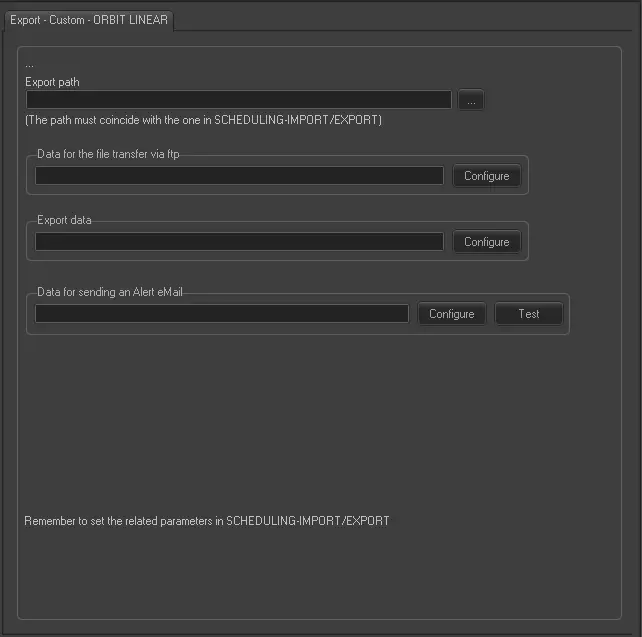
Export - Custom - ORBIT LINEAR
Export Path - Specify the path where the exported xml file would be placed. It must coincide with the path set in the Scheduling related manual export.
Data for the file transfer via FTP - Click on the Configure button and define the FTP parameters as described in Configure Data File Transfer via FTP chapter.
Export data - Opens the Configure Export window to specify the days and the frequency to be exported.
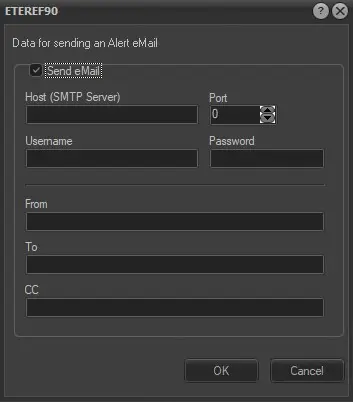
Data for sending an alert email - Enable the “Send email” option and configure the following parameters:
alert_email
Host (SMTP server), Port: The dedicated SMTP server and its port number.
Username and password: User login name and password.
From: Sender's email address.
To: Recipient's email address.
CC: Recipient's email address in the CC list.
Once configured, use the <Test> button to send a dummy email to verify the parameters.
Scheduling Related Export
Set the same parameters in the Etere Scheduling > Import/Export > EXPORT\CUSTOM\ORBIT\EPGLINEARXML, and <APPLY> the changes once done.
 Export_-_Custom_-__ORBIT_LINEAR
 alert_email