63.3.1.1 Recording criteria
It's important to note that recording operations are performed based on the following criteria:
Recordings start at round minutes
•Recordings starts at round minutes (e.g. hh:mm:00), so if you start a recording at an unround minute (e.g. 13:41:17) the recording will wait until the next minute (e.g. 13:42:00) to actually start. For instance:
User pressed the [Start] button at:
07:00:01
13:41:17
The recording will actually start at:
07:01:00
13:42:00
Recordings start at expected times
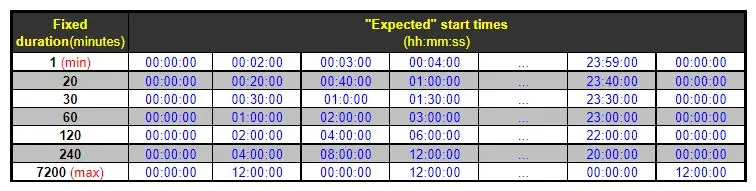
•The start time of recordings is determined by the fixed duration of clips, that is, by the following table:
Fixed duration
In case a recording (e.g. 60 minutes duration) starts at a time (e.g. at 13:42:00) different from the "expected start time" (see table above), said recording will be performed only until the next "expected start time" (e.g. 14:00:00), thus allowing following recordings to start at standard times (e.g. 14:00:00, 15:00:00, 16:00:00 and so on).
Recordings are recorded in UTC time
•Recording times are saved (in the clip name) in UTC time format. For instance, if you start recording at a local time GTM+2 14:48:53, the saved time will be UTC 12:48:53.
Recorded files are named using a standard
•Recorded files are named according to a specific naming format:
MEM[station]M-[yyyymmdd]-[hhmmss].mxf
where:
[station] - The station from which the delayed ingest has been performed.
[yyyymmdd] - The date at which the delayed ingest has started.
[hhmmss] - The UTC time at which the delayed ingest has started.
E.g. if local time is GTM+2 14:48:53, recording time will be UTC 12:48:53.
For instance, a file recorded from the station 001 on 27/01/2013 at 12:48:53 will be named as follows:
MEM001M-20130127-124853.mxf
 Fixed_duration