59.5.8.21 Reconciliation
Report Description
This section allows you to search events with specific properties scheduled within a certain time range and, most importantly, with a given difference of frames between their scheduled and actual duration (calculated according to the start time of its immediate next event in the playlist).
Report Filters
All the parameters that permit a detailed report generation have been spread across seven different tabs to allow a more manageable configuration. By default, all filters are disabled (i.e. they are either blank or unselected); to enable them, it is enough to configure at least one parameter on their inside. Available filters include:
•Filter Events: Indicate if they will include all the events scheduled within the given time range, only those whose type has the 'short event reel' property enabled, or the events meeting a custom selection of styles.
•Frames Difference: Specify the minimum frame difference between the actual duration of the scheduled and transmitted events. By default, this value is considered a minimum value of 1 frame.
•Date Range (from-to): Select the date range on which events intended to be retrieved in the report have been scheduled.
Report Preview
The [Settings] permits configuring the page layout of the outgoing document; once filters and settings have been set, it will be possible to select between displaying a preview using the related [Preview] button or printing the document directly using the [Report] button. Please note that some reports permit the export of the generated document in the most common formats (pdf, CSV, doc, xls, XML, etc) just by using the [Export] button.
automation_reconciliation
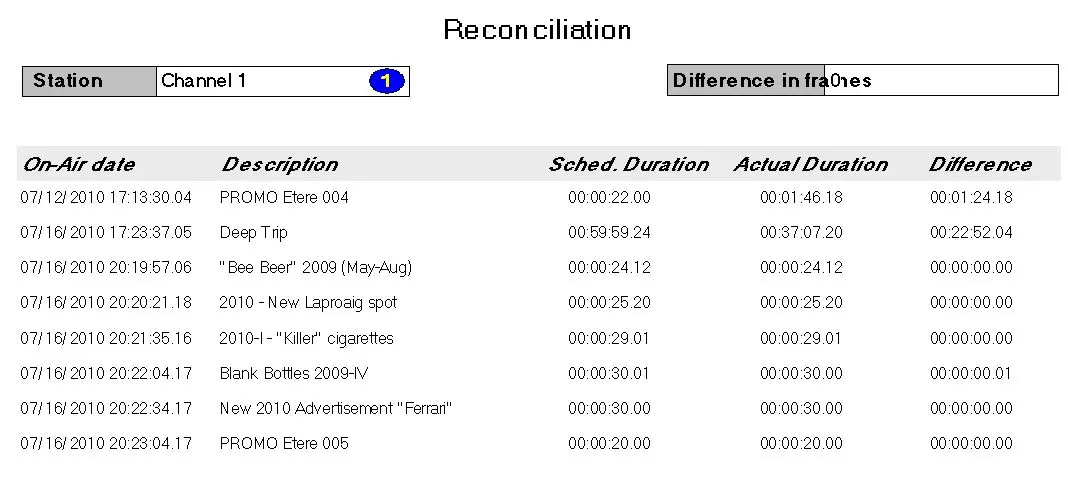 automation_reconciliation