59.5.18.5 Invoicing data
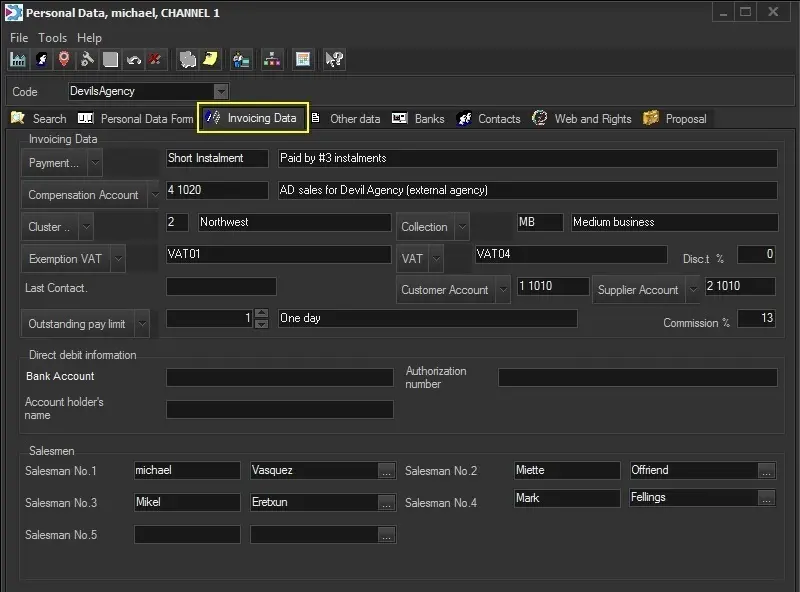
The Invoicing Data section allows defining all the relevant billing information for each contact (e.g. payment type, account, VAT, pay limit, commissions, etc.) to save time while filling contracts:
Invoicing_data
Invoicing data
Payment Type - Assign a particular payment method to the company or person in question. Payments consider instalments, whether they expire at the end of the month, whether the calendar needs to be considered, which bank (if there are several) the payment will be made, etc.
NB: Payments are preset in "Configuration > Invoice Archives > Payments".
Compensation account - Set the ledger account for posting transactions related to the current customer/agency. This account is only used when no compensation account is set for the order's line.
NB: Ledger accounts are set in "Configuration > Settings > Invoice Archives > Chart of accounts".
NB: For more info on invoicing accounts, refer to Money's "Available invoicing modes" chapter.
Cluster - Customer types can be created to help organize your contacts.
NB: Clusters are preset in "Configuration > Settings > Company Tables > Cluster".
Collection - Company types can also be created to help organize your contacts.
NB: Clusters are preset in "Configuration > Settings > Company Tables > Collection".
Exemption VAT - Set the VAT code to be used alternatively for orders and invoices related to goods/services tax-exempted by law.
NB: VAT Codes are preset in "Configuration > Settings > Invoice Archives > VAT codes".
VAT - Set the VAT code as the default for orders and invoices related to this entity.
NB: VAT Codes are preset in "Configuration > Settings > Invoice Archives > VAT codes".
Disc.t % - Enables you to specify how much discount percentage the company/person will receive as standard.
Last contact - Used generally during invoicing periods; insert when the previous contact was made with the company.
Customer Account - Assign an account classification to the company to help with accounts reporting.
NB: Accounts are preset in "Configuration > Settings > Invoice archives > Chart of accounts", where custom account types (asset, liability, etc) can be created with relevant account details for customers.
Supplier Account - Assign an account classification to the company to help with accounts reporting.
NB: Accounts are preset in "Configuration > Settings > Invoice archives > Chart of accounts", where custom account types (asset, liability, etc.) can be created with relevant account details for suppliers.
Outstanding pay limit - Assign an outstanding pay limit to the entity in question.
NB: Outstanding pay limits are preset in "Configuration > Settings > Company tables > Outstanding pay limit".
Commission % - If the current entry is related to an agency, specify the commission due to the agency for sales orders (i.e. to be deduced from the order's total to calculate the net total).
Direct debit information
Direct Debit information - Insert all details needed to set up a direct debit account (the account number, account holder's name and authorization code) should you need to pay the company in question via direct debit, i.e. via electronic bank transfer.
Account Executive
Account Executive (1, 2, 3, 4 and 5) - Manage up to five commissions of the Account Executive related to the current customer. The Etere Air Sales module uses these commissions for creating and invoicing contracts.
 Invoicing_data