66.4.17 Item Archoring
With anchor property, you can change the zero point for positioning items. This property is nested in <anchor> node of item XML description:
XML
<cg-item id='text-000'>
<text type='text' font='Arial' font-size='48' color='White' word-break='no'>Sample Text</text>
<cg-props scale='text-scale' align='top-left' edges-smooth='0' pos-x='0' pos-y='0' show='yes' move-type='accel-both' alpha='255' bg-color='Black(0)' pixel-ar='0.' play-mode='loop' interlace='auto' width='514' height='80' pause='no'>
<indent left='0' right='0' top='0' bottom='0' use-for-bg='no'/>
<group-indent left='0' right='0' top='0' bottom='0'/>
</cg-props>
<anchor item='auto' screen='top'/>
</cg-item>
The anchor node contains two attributes: item and screen.
To specify the position of the item on the screen (where the screen zero point for the item), you should set the screen attribute. You should set the item attribute to specify relative anchoring for your ETX-G item (where internal zero point).
Here is an illustration for different screen anchors:
anchor_1
To illustrate relative item anchors, the item with screen='center' is used:
anchor_2
You can specify item anchors with the SetItemAnchorPos method. This method contains the following parameters:
- _bsItemID - identifier of the item for which anchors are set
- _eItemRelAnchor - item relative anchor. This parameter specifies the 'item' attribute.
- _eScreenRelAnchor - screen relative anchor. This parameter specifies the 'screen' attribute.
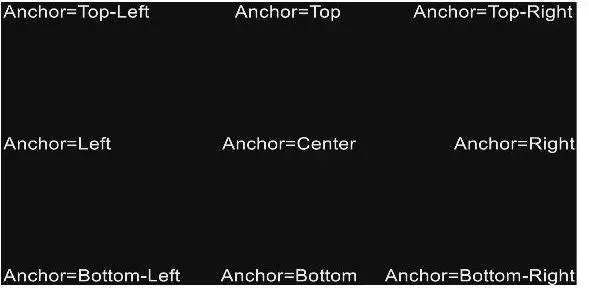 anchor_1
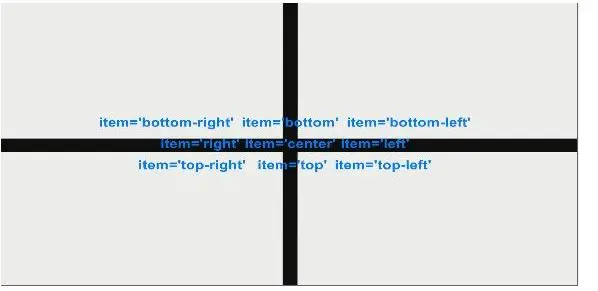 anchor_2