59.2.4.7 Set ARC from Scheduling
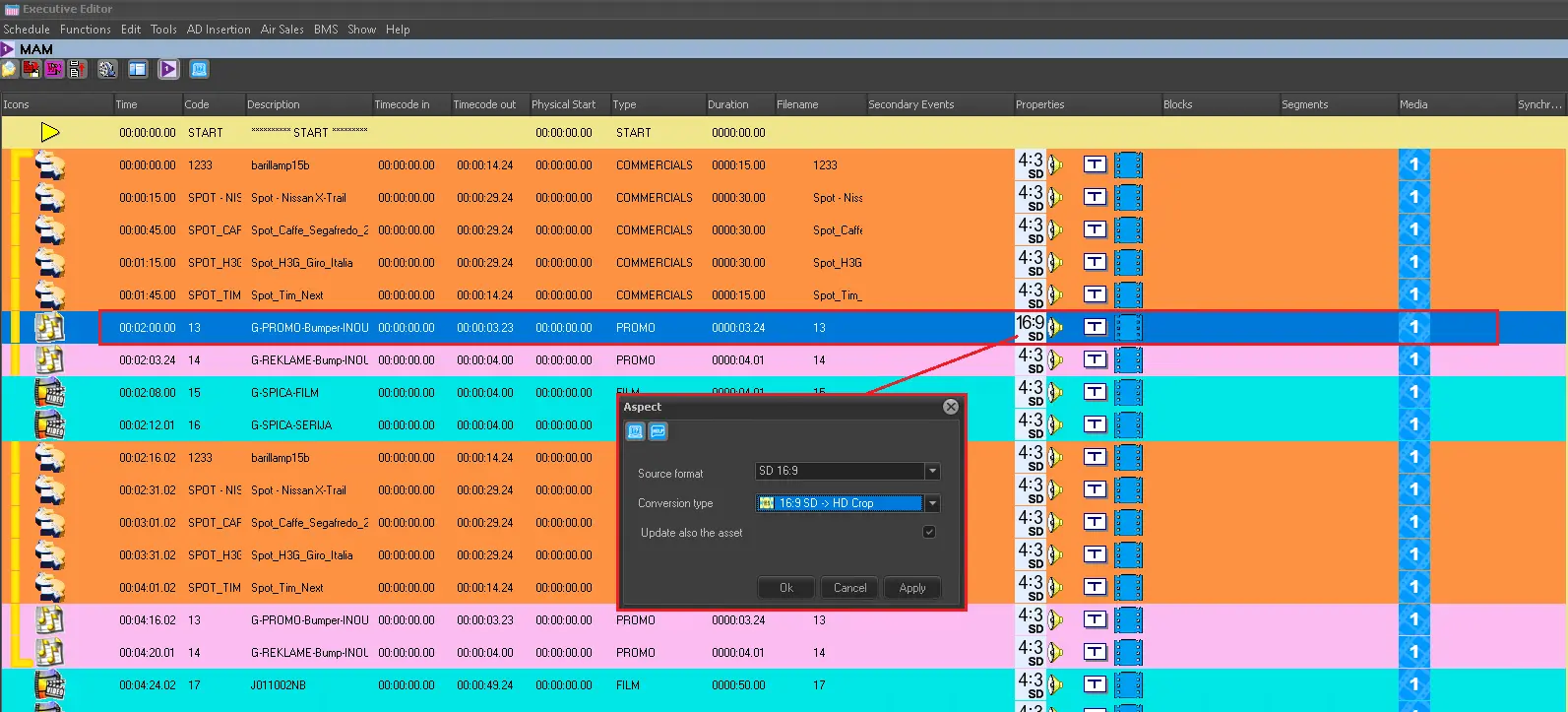
Through its "Aspect ratio conversion" function, the Executive Editor allows to view and modify the aspect ratio of scheduled events and aspect conversion (e.g., automatically convert them during ingest, preview or transmission).
To set this information, follow the procedure described below:
1. In the schedule, right-click on the event and select the "aspect ratio conversion" function:
Executive_Editor
2. Set the following information:
Aspect - Specify the aspect ratio with which the asset is recorded in the media archive. The following SD and SD aspect ratios are supported:
AVAILABLE ASPECT RATIOS:
SD 4:3
SD 16:9
HD
SD 4:3 Letterbox
SD 16:9 Letterbox
3D
SD 14:9 Letterbox
SD Anamorphic
HD 14:9 Pillarbox
HD 4:3 Pillarbox
NB: The Source format will be displayed in the schedule under the Properties column.
SD/HD Conversion - Specify the ARC conversion profile to be performed (by an embedded or external converter) for the current asset. Available SD/HD conversion profiles depend on the asset's Aspect (set above):
ASPECT RATIO: SD 4:3 > AVAILABLE CONVERSIONS: None - SD 4:3 - HD Anamorphic - HD Crop - HD Full - HD Pillar - Unknown
ASPECT RATIO: SD 16:9 > AVAILABLE CONVERSIONS: None - SD 16:9 - HD Anamorphic - HD Crop - HD Full - HD Pillar
ASPECT RATIO: HD > AVAILABLE CONVERSIONS: None - HD - 4:3 Anamorphic - 4:3 Crop - 4:3 Full - 4:3 Letter
ASPECT RATIO: SD 4:3 Letterbox > AVAILABLE CONVERSIONS: None - SD 4:3 Letterbox
ASPECT RATIO: SD 16:9 Letterbox > AVAILABLE CONVERSIONS: None - SD 16:9 Letterbox - HD Anamorphic - HD Crop - HD Full - HD Pillar
ASPECT RATIO: 3D > AVAILABLE CONVERSIONS: None - 3D
ASPECT RATIO: SD 14:9 Letterbox > AVAILABLE CONVERSIONS: None - SD 14:9 Letterbox - HD Anamorphic - HD Crop - HD Full - HD Pillar
ASPECT RATIO: SD Anamorphic > AVAILABLE CONVERSIONS: None - SD Anamorphic - HD Anamorphic - HD Crop - HD Full - HD Pillar
ASPECT RATIO: HD 14:9 Pillarbox > AVAILABLE CONVERSIONS: None - HD 14:9 Pillarbox - 14:9 Crop - Anamorphic - Fullscreen - Letterbox
ASPECT RATIO: HD 4:3 Pillarbox > AVAILABLE CONVERSIONS: None - HD 4:3 Pillarbox - 14:9 Crop - Anamorphic - Fullscreen - Letterbox
NB: The SD/HD conversion will be displayed in the schedule under the properties column, replacing the source aspect icon.
The update also the asset form - If this option is enabled (it is by default), this function also updates the Aspect and ARC properties set in the asset form (see previous chapter "Set ARC from Media Library" for reference).
 Executive_Editor