84.2.4.23 Time Delay
Assigning a Time Delay secondary event to a scheduled live event when it is intended to be transmitted as a deferred event (already started live event). When the Scheduled Ingest module of Etere Ingest detects the presence of a 'time delay' assigned to a live event, it sets the event as 'streaming' to allow their transmission and anticipates its transmission in a certain number of frames; please see the Delaying Live Events chapter for further information.
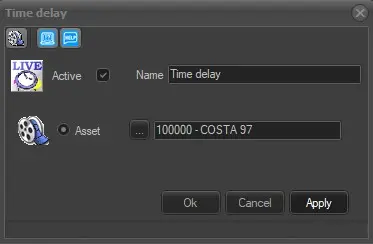
4990_Time_Delay
The parameters required for this secondary event are:
• Active: Tick off this parameter to enable the secondary event, leave it unchecked to disable it.
• Name: Give it a brief descriptive name.
• Icon: Make double-click on the default icon to change it with a more suitable one.
• Asset: Select the asset on which the live event will be (or has been) recorded.
Note: Please note that this secondary event is available only for "live" events.
Media Library [F7]: Positioned in the toolbar of the Time Delay form, it allows to open the Media Library, loading the asset related to the primary event for which the secondary event is being defined.
 time_delay