59.2.2.5 Jingles
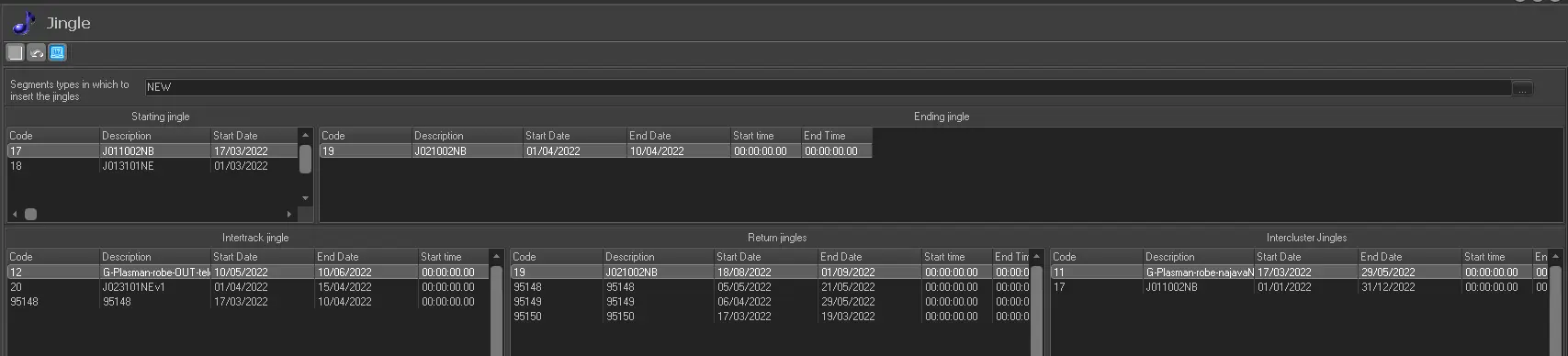
The Jingles section allows to define the various types of jingles to be used during the scheduling process, including the relative assets to be used:
Jingles
•Segment types in which to insert the jingles: allows defining which segment types the defined jingles can be inserted.
•Starting & Ending Jingles: the start jingles are scheduled (inserted) at the start of the segments and the end jingles at the end of the segment.
•Intertrack Jingles: the interval jingles are inserted between tracks in a particular segment.
•Return Jingles: the return jingles are inserted at the end of the split.
Note: To define the assets used as return jingles, the type of the asset must have the property "Return Jingles", and the restart of Etere Configuration is required once the property has been set.
•Intercluster Jingles: these jingles are inserted between commercials in a particular cluster.
For the automatic insertion of jingles from the Strategic Editor application, Jingles are used by the 'Insert jingles and fillers' tool.
Note: Please note that this section won't be available in case of using the Lite version of Etere due to the capabilities limitations of lite channels.
 jingles