69.1.1.19 XML ASSETS FULL
Export Scope
The F90 - XML Assets Full export allows the export of assets from the current site (by using the asset full export) to a given path. Etere F90 would create a reconciliation file containing a list of the exported assets' IDs. This function is the core of the Federate Management capabilities of Etere.
Before and after the export, certain conditions are checked, and some actions are taken:
Before export:
Only those assets that are "Exported to federated sites" with SMPTE metadata set to "true" are automatically processed (exported).
After export:
The "Export to federated sites" SMPTE metadata of exported assets is set to "false".
A reconciliation file (etere.asset.SiteID_totals.txt) is created containing the IDs of ALL assets currently on the local site.
This file is used during the import to verify all imported assets exist in the source site, removing missing files if necessary.
Imported fields:
Detailed information on the fields managed by the XML Asset Full function can be found in the Supported Asset Fields chapter.
Export Parameters
This export allows the following parameters to be set:
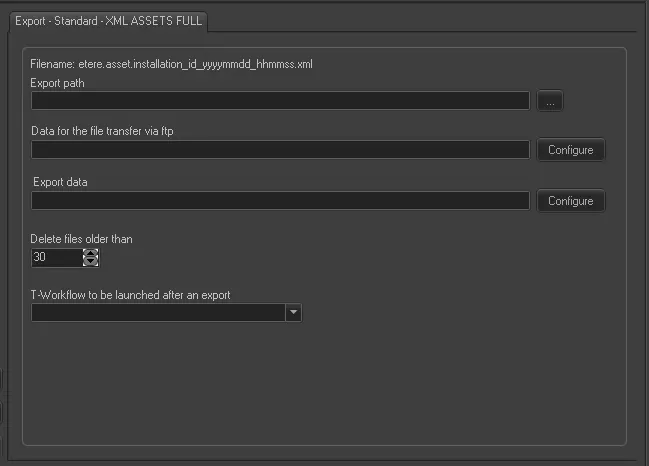
Export - Standard - XML ASSETS FULL
Filename - Data of exported assets are put in single XML files created with the following name format:
etere. Asset.[installation]_[id]_[yyyymmdd]_[hhmmss].xml
[installation] - ID of the source site (e.g. 701)
[id] - ID of the exported asset (e.g. 12345)
[yyyymmdd] - The date when the asset was exported (e.g. 20230831)
[hhmmss] - The time when the asset was exported (e.g. 102245)
NB: The date (yyyymmdd) and time (hhmmss) of exported files are always in UTC format (GMT+0).
Export path - Specify the folder in which the exported files would be stored.
Data for the file transfer via FTP - Click on the Configure button and define the FTP parameters described in the Configure Data File Transfer via FTP chapter.
Export data - Opens the Configure Export window to specify the days the data would be exported and the export frequency.
Delete files older than - If enabled, files stored in the export path longer than the specified days (e.g. 30 days) would be automatically removed.
NB: If problems are encountered during the export process, it is possible to consult them in the "Errors" tab.
Scheduling related export
The "Federated Search" automatic export function of Etere F90 is based on the manual export of Etere Scheduling: EXPORT\STANDARD\GENERIC\XML ASSETS FULL.
 Export_-_Standard_-_XML_ASSETS_FULL