Memory Scheduling
10.5.3 Scheduled Ingest
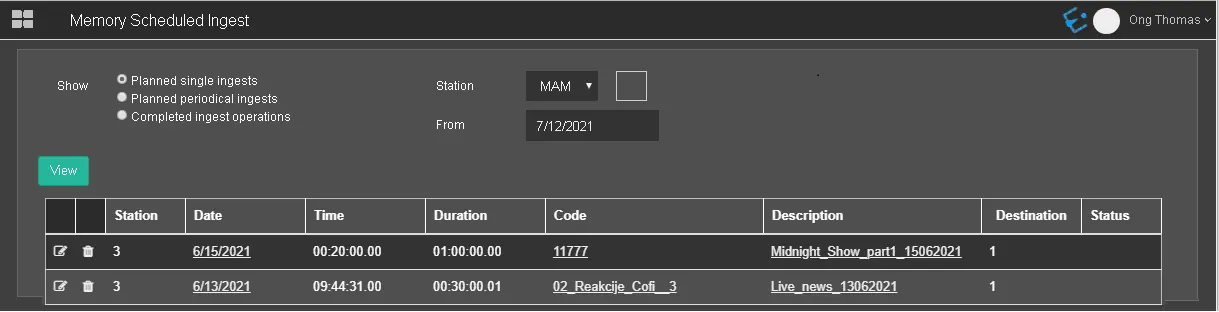
In the Scheduled Ingest section, you can view all submitted recording operations at once.
Memory Scheduled Ingest
SHOW
- Planned single ingests: Display individual ingests operation planned to be executed on a specific date and time from 1 of the ten channels (1 to 10) or all channels.
- Planned periodical ingests: Use this option to display ingest operations scheduled to be executed periodically and repeatedly within the scheduled window, e.g. ingest to start every Tuesday and Friday weekly. Specify the planned ingests from 1 of the ten channels (1 to 10) or all channels.
- Completed ingest operations: This option extracts the completed ingest operations scheduled in 1 of the ten channels (1 to 10) or all channels, regardless of the ingest types, e.g. single ingest, periodical ingests, or live ingests.
- Station: Select 1 of the ten channels from the list, or select "All" to include all channels.
- From: In the "From" parameter, select a date from the calendar to extract planned single ingest starting from the indicated date
If any ingest operation is currently in progress, a letter "R" would appear under the Status column indicating the ingest operation is in a "Running" state.
WARNING: The planned single ingest and periodical ingest would appear in Scheduled Ingest only if the recording time is set within the defined recording time with the Scheduled Ingest option enabled in Memory Configuration.
WARNING: Only applicable for "Planned single ingests" and "Completed ingest operations"
 Memory_Scheduled_Ingest