202.2.2.1 Regulatory Budgets
Regulatory Budgets
The Budget section allows the sales staff to keep an eye on their own budgets as well as customers budget, there are two available types of budgets:
My Budget
The Budget > My Budget section keep the salesman informed about their yearly/monthly objectives:
· Assigned: It is the budget assigned to the selected month, it indicates the forecasted revenues which are expected for the selected month from the current salesman.
· Approved: It is the sum of the total amounts of all the proposals which have been approved for the selected month. In case of proposals straddling different months (i.e. booked over two or more months), only revenues derived from approved events which are scheduled in the selected month would be calculated.
· Invoiced: It is the sum of the total amounts of all proposals invoiced in the selected month. In case of proposals straddling different months (i.e. booked over two or more months), only revenues derived from invoiced events which are scheduled within the month would be calculated.
· Difference: It calculates the difference between the actual revenues (i.e. approved plus invoiced) and the forecasted revenues (i.e.
assigned), thus indicating possible gaps (by color codes) between expectations and perceptions:
- Gray : The month doesn't have any information, that is, neither a forecasted revenue (i.e. assigned budget) nor actual revenues (i.e. approved or invoiced proposals) have been set for it.
- Green : In those months, the actual revenues (i.e. approved plus invoiced) are greater than the forecasted revenues (i.e. assigned budget).
My customers budget
Similar to My Budget, the Budget > Customer section allows the salesman to consult the budget of a customer for a certain year/month:
· Assigned: It is the budget assigned for the selected month, it indicates the forecasted revenues which are expected for the month from the customer.
· Approved: It is the sum of the total amounts of all the proposals which have been approved for the selected month. In case of proposals
straddling different months (i.e. booked over two or more months), only revenues derived from approved events which are scheduled on the month in question will be calculated.
· Invoiced: It is the sum of the total amounts of all proposals invoiced in the selected month. In case of proposals straddling different months (i.e. booked over two or more months), only revenues derived from invoiced events which are scheduled on the selected month would be calculated.
· Difference: It calculates the difference between the actual revenues (i.e. approved plus invoiced) and the forecasted revenues (i.e. assigned), indicating possible gaps (using color codes) between expectations and perceptions:
- Gray : The month doesn't have any information, neither a forecasted revenue (i.e. assigned budget) nor actual revenues (i.e. approved or invoiced proposals) have been set for it.
- Green : In those months, the actual revenues (i.e. approved plus invoiced) are greater than the forecasted revenues (i.e. assigned budget).
- Red : In those months, the actual revenues (i.e. approved plus invoiced) are lower than the forecasted revenues (i.e. assigned budget).
Moreover, the blue box displayed at the start of each year present a yearly summary at a glance, including the total budget assigned, the total used and balance between the two amounts, either positive or negative
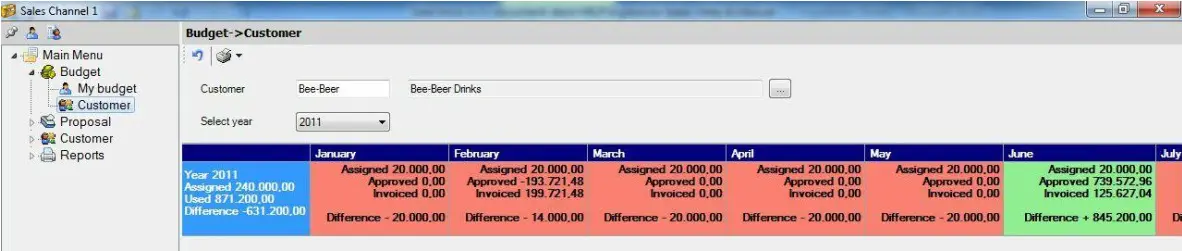 Budget-Customer
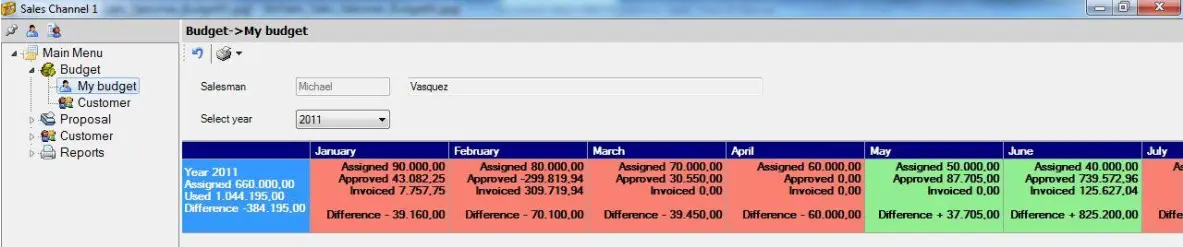 Budget-My-Budget