59.2.38.2 Script Editor
By pressing 'Script Editor', the editor form will be opened; it is composed of the following four tabs:
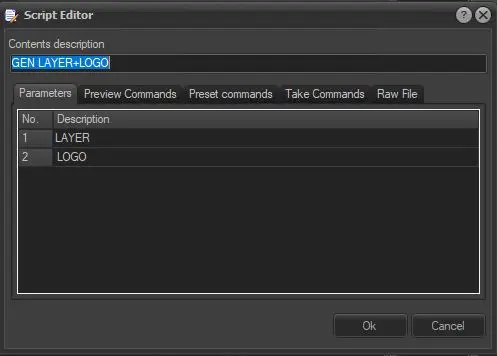
•Parameters: In this tab, the number of parameters is defined (how many variable parts there are), and the descriptions of various parameters in the script file
Script_Editor_Parameters
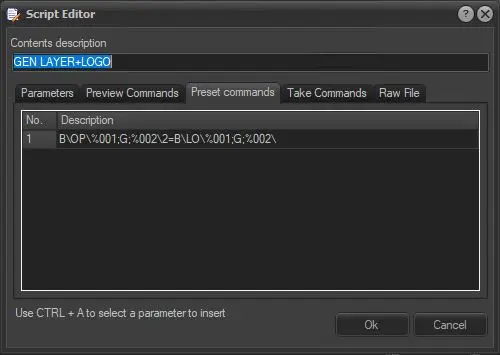
•Preset Commands: In this tab, the commands to send to the device during PRESET are defined, one command for each line. The line command is executed one at a time; the next command can only trigger after the received positive reply from the previous command. Commands can be parameterised by inserting variable %001, %002, ..., the automation will replace the variable at run time with values scheduled in scheduling.
Preset_Commands
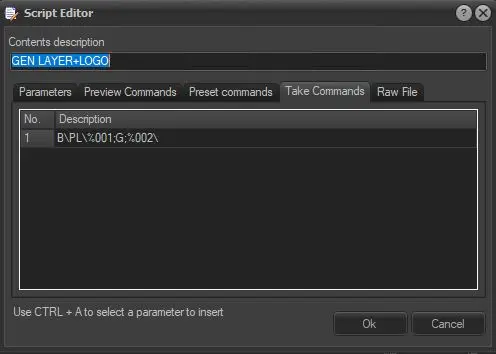
•Take Commands: In this tab, the commands to send to the device during TAKE are defined, one command for each line. The line command is executed simultaneously; the next command can only trigger after receiving a positive reply from the previous command. Commands can be parameterised by inserting variable %001, %002, ..., the automation will replace the variable at run time with values scheduled in scheduling.
Take_Commands
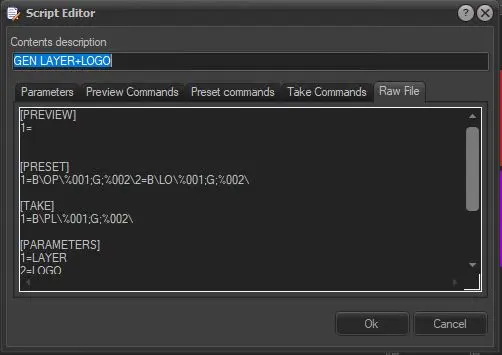
•Raw File: In this tab, the SCRIPT file is shown as a whole. It can be edited or copied/pasted from another SCRIPT file. All modifications are reproduced in the various tabs.
Raw_File
NB: Please note that if a ComStream DAC audio codec/multiplexer is installed in the Etere system, an alternate version of the Script Editor will be displayed; for further details, refer to the COMStream DAC.
 Script_Editor_Parameters
 Preset_Commands
 Take_Commands
 Raw_File