59.2.40.8 Parental Guidance Ratings
The Parental Guidance section allows the definition of a rating system to restrict the scheduling of inappropriate content completely or on specific time slots, thus making playlists compliant with related broadcasting laws.
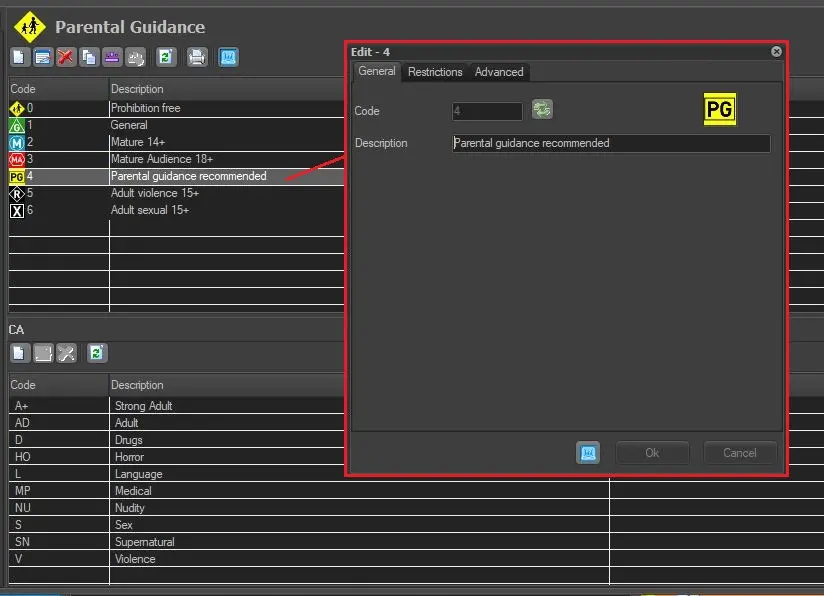
Parental Guidance ratings in this section can be personalised by adding a new rating or editing the existing rating; simply click on the 'New' button or double-click on current parental guidance; the following parameters will be available:
Parental_Guidance_Ratings
General tab
The General tab allows to specify the code and description of each single parental guidance classification:
Code - An univocal number to internally identify parental guidance within the system.
Description - A brief description of the contents.
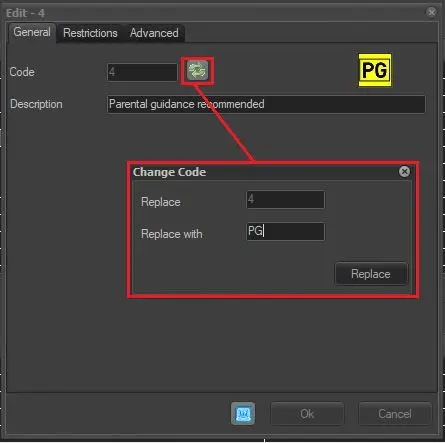
Code replacement - This button replace the code with another code:
This_button_replace_the_code__with_another_code
Once the 'Replace' button is clicked, the code will be replaced, extending this replacement to all the asset forms currently associated with the parental guidance classification in question.
Restrictions
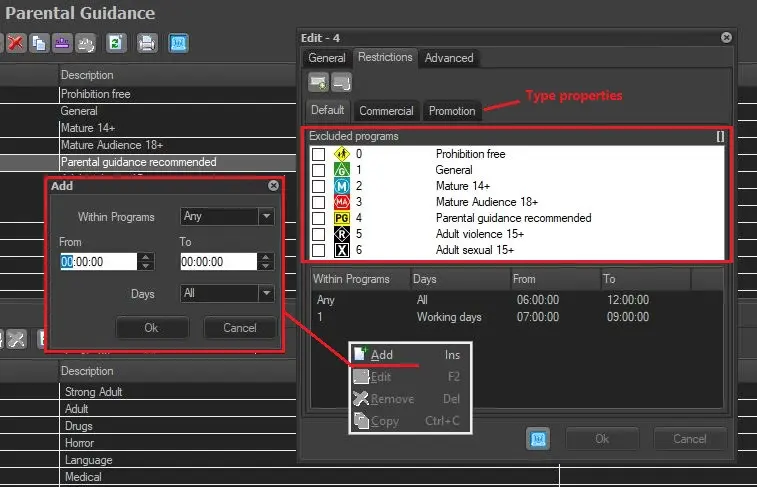
The Restrictions tab enables you to specify scheduling restrictions applied to each parental guidance rating. Select the tab (property) to which restrictions will be applied to configure restrictions. Users can define restrictions under the default tab (to all events) or under other specific properties (e.g. event, tv movie, news, commercials, etc.) with the [ Add property] button:
Restrictions
A parental restriction consists of preventing programs (e.g. spots) with a certain parental rating (e.g. MA +15) from being completely/partially contained (scheduled) within programs (e.g. cartoons) with a protected parental rating (e.g. general audience).
The container of a program (A) is the immediately previous scheduled program (B) matching the given property (default=any, event, commercial, etc.). In these terms, the tab's related property indicates the system how to determine the container program to be protected.
For instance, all restrictions configured under the "commercial" tab will be applied to container programs matching that property.
Restrictions can be applied in two different ways (complete and partial restrictions) under two other areas:
TOP (restrict from within programs any day at any time)
Specify complete restrictions to always prevent events with the current parental guidance rating from being scheduled within programs featuring the selected rating and property on any day. To set a complete restriction, tick off the rating to be excluded.
For instance, open the "Mature 15+" rating and exclude the "General" rating under the "commercial" tab; all commercials featuring a mature 15+ rating won't be allowed to schedule within General programs on any day at any time.
BOTTOM (restrict from within programs on specific days and times)
Specify partial restrictions to prevent events with the current parental guidance rating to be scheduled within programs featuring the selected rating and property only on the given days and time slots. To set a partial restriction, set the following parameters:
Within programs - Indicate the specific parental guidance code to which the restriction will be applied, or select 'any' to use it for all of them.
Days - Select the days on which the restriction level will be applied; possible values include 'all days', only 'working days' or any of the 'holiday types' defined under the Holidays section.
From - To - Specify the restriction level's time range.
Note:
If both restrictions, excluded programs and within programs, are set for a certain "parental guidance", the first one will predominate since it is valid for all days and time slots.
Please remember that different properties can be enabled for each asset type (e.g. spots, news) under the Types Editor > Properties section.
Advanced tab
•External Code: This field allows to specify an external code that can be used, for example, during the import/export of parental guidance classifications from/to another system.
 Parental_Guidance_Ratings
 This_button_replace_the_code__with_another_code
 Restrictions