84.4.5.27 STANDARD > MORPHEUS ASRUN XML
Import Scope
The Morpheus AsRun XML allows importing a file in XML format containing the AsRun log of events transmitted by a Snell Morpheus automation system.
The import will be performed under the following specifications:
File structure
The filename must follow the format below:
[station]_[date]_[version].xml (e.g. IMP_SD1S_20141223_001.xml)
where:
▪[Station] : configurable prefix.
▪[Date] : date to e imported (YYYYMMDD).
▪[version] : version.
Import process
Check the validity of the file structure
✓The file must contain at least one "MainEvent"
✓Filename respect be match the naming convention
✓Dates specified inside must match the date specified in the filename
In case one of the above controls fails, the file won't be imported as it will be considered "invalid".
Before starting the imported, all events already scheduled in the concerning date are set as "not transmitted" (i.e. "I").
Only events belonging to the "MainEvent" type (EventKind) will be imported; other types include:
EventKind - BreakHeader
Description : Break headers that indicate the total break duration
EventKind - MainEvent
Description : Regular events
EventKind - MaterialEvent
Description : Material linked to main events
EventKind - Normal
Description : Secondary events (gpi, epg, router, etc.)
Main events are looked within the concerning playlist (TPalinse), matching them according to their "HouseNumber", "SegmentNumber" and "EventTime"; taking one of the following actions depending on the matching result:
An event is matched - The matched event is updated with the imported "start time" "duration" and its "transmission status" is set to "D" (i.e. transmitted).
No event is matched - The event is inserted into the schedule (Tpalinse) and logged in the "errors" tab.
HouseNumber is empty - In the event the <HouseNumber> field is empty, the following 2 conditions applied:
-If the <GuardMaterialID> field contained a value begins with “IMP_” as asset code (e.g. IMP_ID23456), the value after the “IMP_” would be used as Etere asset code during import. In this example, the value of <HouseNumber> field would be set to “ID23456”.
-If the <GuardMaterialID> field is blank or does not contained a value begins with “IMP_” as its asset code, the value of <HouseNumber> field would be set to “UNK”.
During import, in search for the corresponding events in the palimpsest, events that closest to the scheduled time would take precedence over events based on real time.
Once the import is completed, the "RebuildxOrder" function will be executed to sort events based on their scheduling order.
Import parameters
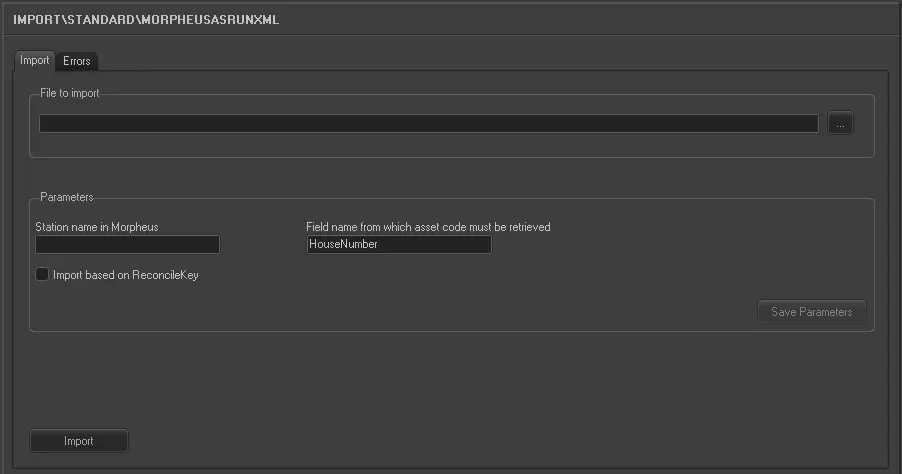
This import allows the following parameters to be set and then [saved]:
Import_standard_morpheus_asrun_xml
Import tab
File to import - Browse and select the folder where files to be imported will be stored.
Note: Files must be named according to what specified in the previous "File Structure" section.
Station name in Morpheus - Code of the station related to the playlist to be imported (e.g. IMP_SD1S), and prefix of the file to be imported.
Import based on Reconcile Key - When a reconcile key is used during the export operation (by selecting the table field TPALINSE.EXTERSTRID (consists of key value) during export), a reconcile key is stored in the export XML file. If this option is enabled, the reconcile key would be used to ensure an accuracy import of the schedules. If this option is disabled, the import would be based on the dates and station name as per usual practice.
Though the Reconcile Key is unique, in certain circumstance, the exported file could consist 2 EXTERSTRID field with the same Reconcile key’s value, one in level 0 (zero) and one in level 500 (level 500 and above are used for certification), the import is capable of managing more than one EXTERSTRID with same value in the export file.
If this option is enabled, when you click the “Save parameters” and start the import process, the option would remained as enabled when you launch the import module.
Rules applied when import using Reconcile Key:
•The user code (01, 02, 03, etc) of the import instance must matched the first 2 digits of the reconcile key.
•The remaining values (other than the first 2 digits) in reconcile key must consists of 10 characters values greater than 0 (zero).
•There must be only event with the reconcile key in the schedule.
•The data corresponding to the reconcile key is same as the import date.
•During import, if the reconcile key in the xml file does not point to the schedule, or point to an asset other than the asset being imported, the reconcile key in not used.
Name of the field from get Asset Code - Specify a field name among other fields in the XML file to import transmitted assets into Etere system. The default field name is “HouseNumber".
Errors tab
The Errors tab captured and displayed the import errors, where events were not presented in the schedule during the import. The error information includes event asset code, scheduled time, and description of error. The “scheduled time” captured in the error log is retrieved from the parameter “AsRunStartTime” field when the event went on-air.
You can save the errors log report to a text file by right click on display and select “Save to file” option. The default filename conversion is “name of the import file + _ErrorsReport.txt”.
Launch the import
Once all parameters have been correctly set, just press the <Import> button to launch the import operation.
Sample file to import
The file to be imported using this method will have to the following structure in order to be correctly imported:
<?xml version="1.0" encoding="UTF-8" ?>
<Schedule>
<Events Channel="HOB SD1" >
<Event Uid="2780943" Type="HOB SD1 Break Header" FullyQualifiedType="HOB SD1 Break Header" NotionalStartTime="06-JUL-2014 20:06:43:08" NotionalDuration="00:03:50:00">
<PreviousUid>-1</PreviousUid>
<OwnerUid>-1</OwnerUid>
<IsFixed>True</IsFixed>
<EventKind>BreakHeader</EventKind>
<Fields>
<Parameter Name="AllowNetworkTake" Value="False" />
<Parameter Name="BxfId" Value="00000000-0000-0000-0000-000000000000" />
<Parameter Name="Device" Value="" />
<Parameter Name="DeviceGroup" Value="" />
<Parameter Name="Duration" Value="00:03:50:00" />
<Parameter Name="DurationMode" Value="UseChildren" />
<Parameter Name="Enabled" Value="True" />
<Parameter Name="EndTimeOffset" Value="00:00:00:00" />
<Parameter Name="EventName" Value="Break Number 1 (TODAY (S) (NA) (SEG 1))" />
<Parameter Name="HoldFlag" Value="False" />
<Parameter Name="IsGuardEvent" Value="False" />
<Parameter Name="ManualTake" Value="False" />
<Parameter Name="StartMode" Value="ReferenceToParentsEnd" />
<Parameter Name="StartTimeOffset" Value="07-JUL-2014 06:06:43:08 LOCAL" />
<Parameter Name="TimeLinkDeclaration" Value="AMD_PRG1SD12014-07-07T06:07:00:00" />
<Parameter Name="TimeLinkReference" Value="AMDSD12014-07-07T06:07:00:00" />
<Parameter Name="TrueTime" Value="False" />
<Parameter Name="AsRunOid" Value="{1CC4BAE8-15F4F9FA}" />
<Parameter Name="AsRunStartTime" Value="07-JUL-2014 06:06:43:08" />
<Parameter Name="AsRunKernelStatusCode" Value="Unknown" />
<Parameter Name="AsRunEffectiveEnabledState" Value="True" />
<Parameter Name="AsRunStartedOnAir" Value="False" />
<Parameter Name="AsRunDuration" Value="00:03:50:00" />
<Parameter Name="AsRunFinishedOnAir" Value="False" />
<Parameter Name="AsRunEndTime" Value="07-JUL-2014 06:10:33:08" />
</Fields>
</Event>
<Event Uid="2780944" Type="HOB SD1 Default Main Event" FullyQualifiedType="HOB SD1 Default Main Event" NotionalStartTime="06-JUL-2014 20:06:43:08" NotionalDuration="00:00:40:00">
<PreviousUid>-1</PreviousUid>
<OwnerUid>2780943</OwnerUid>
<IsFixed>True</IsFixed>
<EventKind>MainEvent</EventKind>
<Fields>
<Parameter Name="ACMAClassification" Value="" />
<Parameter Name="AllowNetworkTake" Value="False" />
<Parameter Name="AspectRatio" Value="0" />
<Parameter Name="AssetId" Value="PPWIN0000076731" />
<Parameter Name="AudioGain" Value="0" Label="0 dB" />
<Parameter Name="AudioLag" Value="00:00:00:00" />
<Parameter Name="AudioLagOut" Value="00:00:00:00" />
</Fields>
</Event>
</Events>
</Schedule>
 5235_Import_standard_morpheus_asrun_xml