84.4.4.14 STANDARD > EPG > XML-TV SAT
Export Scope
The EPG XML-TVSAT export allows creating an XML file (with a .XML extension) containing the broadcast playlists (and related scheduled events) for a period of time of up to 7 days.
Export process
Files will be exported according to the following naming convention:
[Prefix]_[ServiceID].XML (e.g. Channel1_17.xml)
where:
▪Prefix: The brief name of the station from which the export is performed.
▪ServiceID: The Service ID(s) for which the export is performed. It must be minimum 3 characters.
One separate file will be exported for each service configured.
The <name> tag is retrieved from the title (i.e. filmati.descrizio) of scheduled assets.
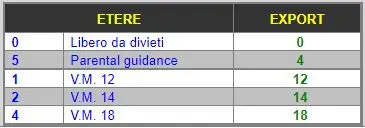
The "N" value of the <Parental_Rating country="ita" minimal_age="N"/> tag is exported based on the convention below:
5075_Export_process
The maximum length of SHORT_DESCRIPTION is 254
In case the # character is the leading character of the SHORT_DESCRIPTION in "EPG Language 1" field, it's automatically removed.
Export Parameters
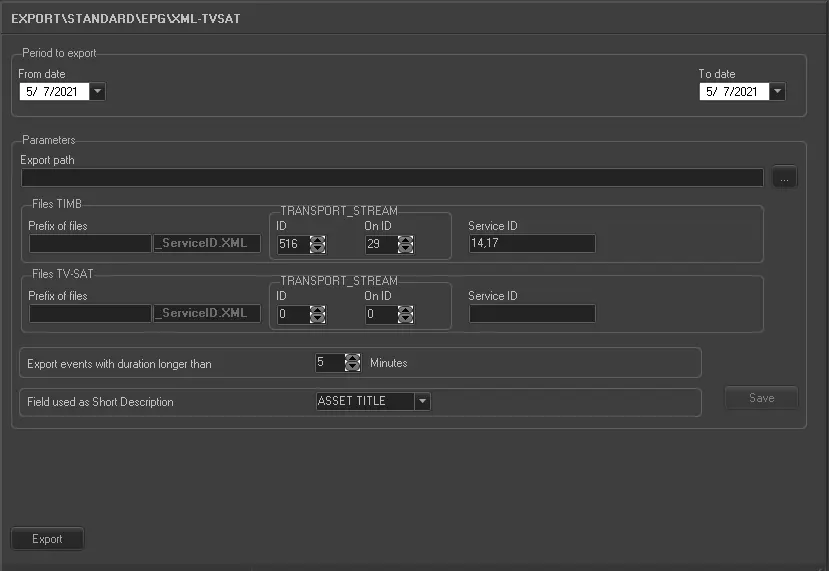
This export module requires the following parameters to be set in order to be correctly used:
5074_Export_standard_epg_xml_tvsat
•Period to export (from date - to date): Indicate the date range on which the schedules to be exported are contained, with the maximum of 7 days. If export beyond the 24 hours time zone, no additional one day would be added to the exported file.
•Export path: Indicate the path to the directory on which the exported files will be stored once generated,
•Transport Stream: Indicate in the ID and On ID parameters the 'MUX ID' and the 'DTT Provider ID' respectively,
•Service ID: Indicate the number of the service ID. It must be minimum 3 characters.
Note: In case of multiple services, specify their codes separating them with a comma (,)
•Prefix of files: Exported files will be named according to the naming convention described at the start of this chapter.
•Export events with a duration longer than: This parameter permits to export only those events which duration is longer than the value specified here, ignoring events with shorter durations.
•Field used as Short Description: It simply allows to select the assets table field to be used for the short description of scheduled events. Possible fields are:
- ASSET TITLE : it will use the field FILMATI.DESCRIZIO from the Etere's database.
- STORY : it will use the field FILMATI.TRAMA from the Etere's database.
- EPG1 : it will use the field FILMATI.DESCRIZIO_1 from the Etere's database.
- EPG2 : it will use the field FILMATI.DESCRIZIO_2 from the Etere's database.
Launch the export
Once the export has been configured, it can be started just by pressing the <Export> button, a file will be created for each Service ID.
Sample file to import
The exported file using this method will have to the following structure:
<?xml version="1.0" encoding="ISO-8859-1" standalone="no"?><PSI xmlns:fo="http://www.w3.org/1999/XSL/Format">
<TRANSPORT_STREAM id="516" on_id="29">
<SERVICE id="14">
<EVENT ca="false" duration="PT15M" time="2014-09-10T04:00:00">
<NAME lang="ita">National Live News</NAME>
<SHORT_DESCRIPTION lang="ita">National Live News</SHORT_DESCRIPTION>
<PARENTAL_RATING country="ita" minimal_age="0"/>
</EVENT>
<EVENT ca="false" duration="PT15M" time="2014-09-10T04:15:00">
<NAME lang="ita">National Live News</NAME>
<SHORT_DESCRIPTION lang="ita">National Live News</SHORT_DESCRIPTION>
<PARENTAL_RATING country="ita" minimal_age="0"/>
</EVENT>
<EVENT ca="false" duration="PT15M" time="2014-09-10T04:35:00">
<NAME lang="ita">National Live News</NAME>
<SHORT_DESCRIPTION lang="ita">National Live News</SHORT_DESCRIPTION>
<PARENTAL_RATING country="ita" minimal_age="0"/>
</EVENT>
...
</SERVICE>
</TRANSPORT_STREAM>
</PSI>
 5075_Export_process
 5074_Export_standard_epg_xml_tvsat