18.1.1 General Settings
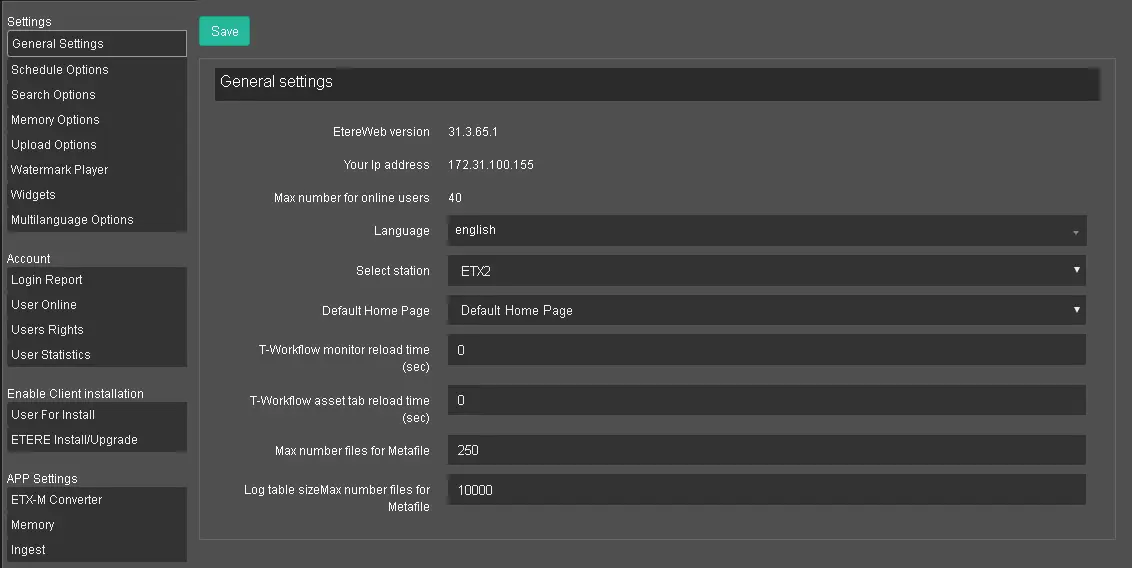
The General Settings tab displays the general information of the workstation accessing the Etere Web site.
General Settings
EtereWeb version: It displays the current version of EtereWeb installed in the workstation;
Your IP address: it displays the IP address of the connected workstation;
The max number for online users: It shows the maximum number of users allowed to log in to EtereWeb, as indicated in the license;
Language: Select the preferred language to be used in EtereWeb. This setting would take effect when the workstation is restarted;
Select Station: Select the station/channel where the logged-in user triggers the Web access;
Default Home Page: Select a web page as the default Home Page each time the user login to EtereWeb;
You can also select Dashboard as Home Page to view system information at one glance when logging in to EtereWeb.
T-Workflow monitor reload time (sec): Specify the time interval (in seconds) to auto-update the T-workflow monitoring view;
T-Workflow asset tab reload time (sec): Specify the time interval (in seconds) to auto-update the T-workflow asset tab;
Max number of files for Metafile: Specify the maximum number of files that can be retrieved for Metafile;
Log table size Max number files for Metafile: Indicate the number of log data rows to be written in the log table, with a minimum of 1000 to a maximum of 2,000,000 (2 million rows). By default, it is set to 1000;
When settings are confirmed, click the <Save> button to save the configuration.
 General_Settings