85.2.19.2 How to use it
Once this feature is enabled, Etere STMan will open the connection with the configured web server and will display start sending information for related transmitted events.
Manual usage
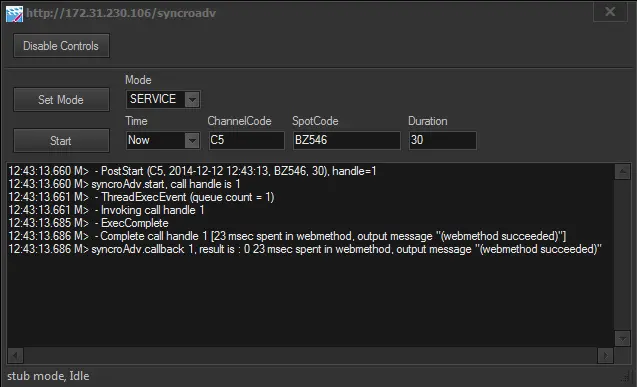
This plugin automatically sends information, however, pressing the [SyncroADV Service] button available in the bottom part of the Playout Status window will allow to manually send commands to the SyncroADV server:
SyncroADV Service
Stman SyncroADV Service
1. Press the [Enable controls] button
2. Set the command parameters as required
3. Press the [Start] button
Command logs
It's worth mentioning that logs related to this plugin are stored in the Etere's Logs directory, with the following name format:
stman.eterestman.XXX.YYY.SYA-plugin.log
where:
XXX: Variable string, it's the station ID (e.g. 001)
YYY: Variable string, it's the computer name (e.g. aumainsrv)
SYA: Fixed string, it's the identification name of the plugin
 SyncroADV_Service
 Stman_SyncroADV_Service