201.3.3.1 Create promo
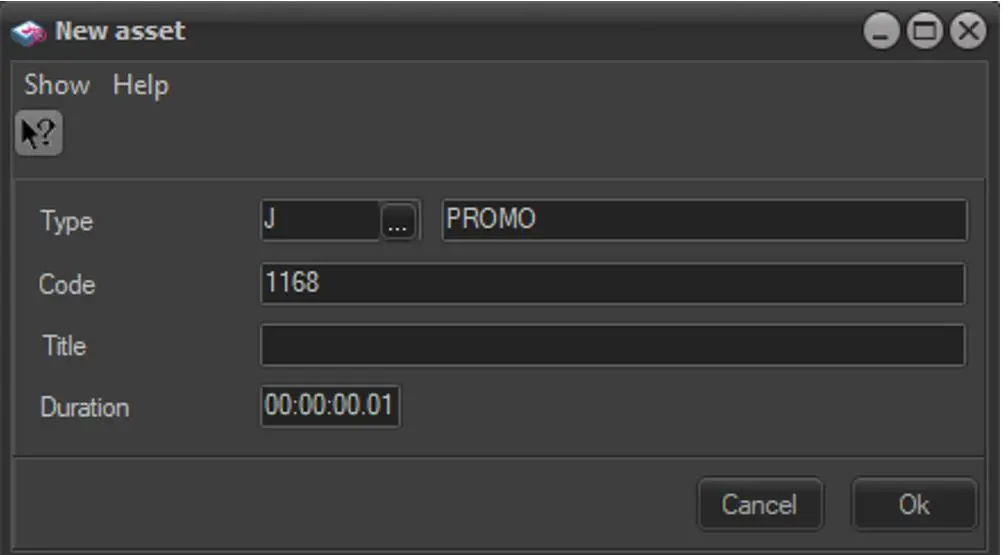
The [Create promo] tool allows to easily create a new trailer, linking it automatically to the current season. It is useful to create a trailer that will announce a program. When creating a trailer the data detailed below is required, compile it and press the [Ok] button to complete the creation:
Airsales_seriesmanager_tools_createpromo
Field - Type
Description : Select a type amongst the ones present in the list, only those types with a promo property (i.e. 'cross-station promo', 'generic promo' or 'promotion') enabled will be displayed.
Field - Code
Description : Indicate the asset code to be assigned to the promo.
Field - Description
Description : Enter a brief description for the new trailer.
Field - Duration
Description : Insert the expected duration of the trailer asset.
Field - Tapeless
Description : Specify the person in charge of receiving the asset as well as the agency that will deliver at a certain scheduled date (using Etere Tapeless Reception).
Field - Notes
Description : Include any further information related to the asset.
NB: Please note that the creation of trailers from the Season Manager module regards only multiple-asset programs (e.g. TV season), in case it is intended to create trailers for a single-asset program (e.g. films, news, seasons episodes, etc) please refer to the Asset Form module chapter.
Link between seasons and trailers
The recently created trailers will be associated to the season and will be present under the Link tab, from which it will be accessible by double-click on it.
Scheduling trailers
Once created, trailers can be managed under a centralized Promo Management module, it can be placed into the schedule using either the Executive Editor or Strategic Editor modules.
 Airsales_seriesmanager_tools_createpromo