59.3.9.134 Workflow Action
Action Description
The "Workflow action" enables T-workflows to handle other T-workflow instances; that is, they allow triggering another T-workflow (e.g. wf2) from within a current T-workflow (e.g. wf1).
Note: When T-workflow (e.g. wf2) is attached from a source T-workflow (e.g. wf1), it automatically inherits the reference metafile of the source T-workflow.
Action Parameters
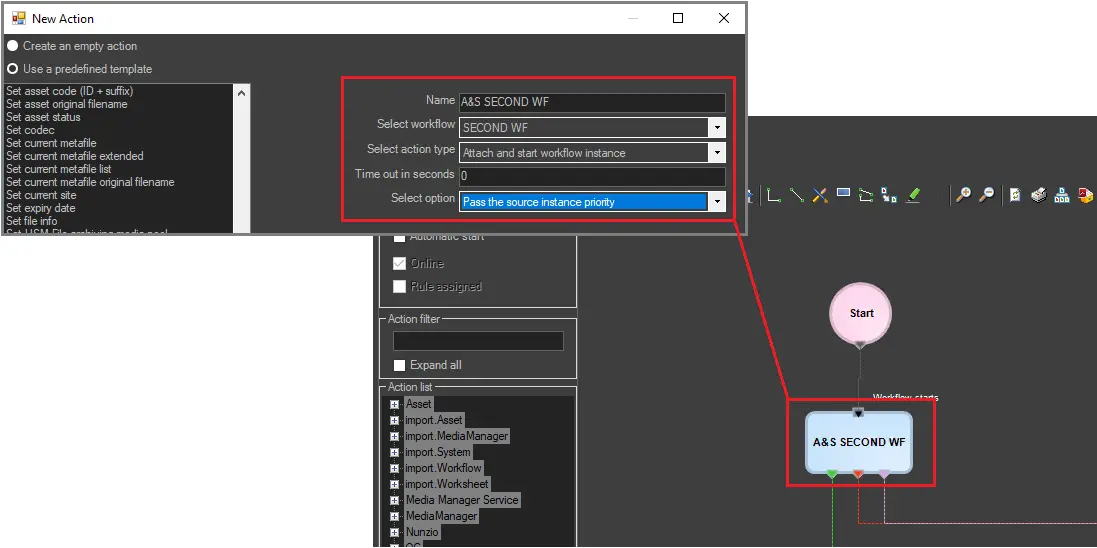
To create this action, you have to compile the following fields:
Parameters
Name - Enter here the name of the action; it is suggested to give it a brief and self-descriptive name (e.g. 'Add Quality Check').
Select workflow - Specify the T-workflow named after the current action.
Select action type - Choose the exact action to be performed; available actions are listed and explained below:
Attach workflow instance - The selected T-workflow will be associated with the asset, but it won't be started; the action will return output based on its result: attached / not attached
attach and start workflow instance - The selected T-workflow will be associated with the asset and launched; the action will return an output based on its result: attached / not attached / / / already started
start workflow instance - The selected T-workflow will be launched if already associated with the asset; the action will return an output depending on the result of the operation: started / not started / already started / not exists
abort workflow instance - The selected T-workflow will be aborted if already associated with the asset; the action will return an output depending on the result of the operation:
Aborted / not aborted / not exist
reset workflow instance - The selected T-workflow will be reset (i.e. stopped and set the initial state) is already associated with the asset; the action will return an output depending on the result of the operation: reset / not reset / not exist
restart workflow instance - The selected T-workflow will be restarted (i.e., reset and started again), and the action will return an output depending on the result of the operation: reset / not reset / not exist
detach workflow instance - The selected T-workflow will be disassociated from the asset, and the action will return an output depending on the result of the operation: detached / not detached / not exist
detach workflow inactive instance - The selected T-workflow will be disassociated from the asset only in case the T-workflow is not active; the action will return an output depending on the result of the operation: detached / not detached / not exist
workflow instance status - The action will produce an output based on the current status of the selected T-workflow in the associated asset: not exist / not started / active / hanging / completed/aborted/faulted.
wait for workflow instance end - This action will cause the MAIN T-workflow to wait until the selected T-workflow is completed (or the timeout is reached); this action will return an output depending on its result: timeout / completed / not exist
workflow instance hanging check - The action will produce an output depending on the current status of the selected T-workflow in the associated asset: hanging / not hanging
workflow instance running check - The action will return an output depending on the current status of the chosen T-workflow in the related asset: running / not running
workflow instance ended check - The action will produce an output based on the current status of the selected T-workflow in the associated asset: ended / not ended
Timeout (seconds) - Indicate here the maximum waiting time for the action type "wait for workflow instance end". Leave this parameter to zero (0) to not use a timeout and wait until the T-workflow instance ends.
Select option - Optionally, choose to pass the instance priority of the source T-workflow.
How to use it
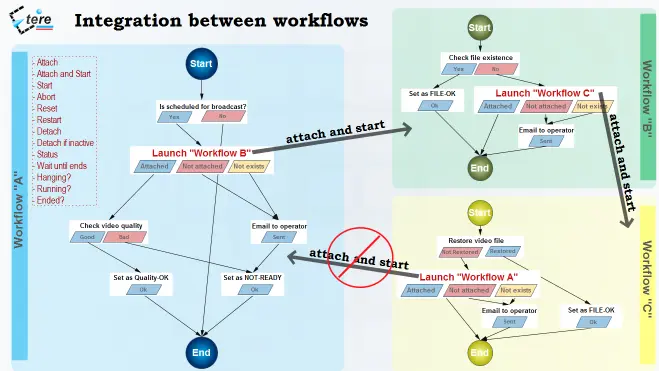
This action can be used for integrating T-workflows, that is, calling a T-workflow(s) from another just by inserting an action that can perform a specific task (i.e.: attach, attach and start, start, abort, reset, restart, detach, etc.) on a certain T-workflow:
3744_Workflow_Action
The diagram illustrates how Etere maintains the system consistency by avoiding loops between T-workflows (a message is displayed indicating the incompatibility between action and T-workflow)
Diagram
Note: As shown above, if 'WF A' calls 'WF B' and the 'WF B' calls 'WF C', the 'WF C' will not be able to call the 'WF A' to prevent loop issues.
 Workflow_Action
 5301_Diagram