74.2.1 Control Panel
Before using Etere MOS Gateway, it is necessary to specify some parameters that will permit Etere MOS Gateway to communicate with Newsroom systems, these parameters are set in the Control Panel where it's possible to define:
MOS PROTOCOL SETTINGS
Mosgate_configuration01
•mosID: It allows identification and communication between the Newsroom system and Etere. It must be inserted in the "mosID" field and also in the MOS_RTA.TRL tab, substituting the default one. The mosID in the MOS_RTA.TRL lets Etere MOS Gateway send information to Etere Automation. Once defined the mosID, Etere MOS Gateway application must be restarted in order to let the new settings be available for the system.
NB: In case of using an ENPS system, note that by default the mosID is case sensitive so the it must be written on Etere and ENPS the same, or you can change from ENPS system maintenance -> global configuration table ->CASESENSITIVE = 0.
•RO (Running Order): The activation of this parameter allows one to receive the playlist sent by the Newsroom system (RunDown). The RunDown is interpreted by Etere MOS Gateway and converted into a format that Etere Automation can read. The default TCP/IP port is 10540 (which may change depending on the newsroom system).
•RO Port (Upper Port): RunDown is sent by the Newsroom system to Etere through RO Port. The default TCP/IP port is 10541 (which may change depending on the newsroom system).
•Get RO from all ncsIDs: allows one to receive RunDown from all the NRCS workstations. If there are other NRCS workstations, by activating this function Etere MOS Gateway actually notices all the Running Orders received by the Ro Port, but only takes into account the ones which have the same mosID previously defined.
If there is only one NRCS workstation, it is possible to deactivate the "Get RO from all ncsIDs" function and to manually insert the ncsID; the syntax is "NSCD DNS:IP". E.g. SERVERENPS:192.168.0.100
•Mom (Media Object Messages): by activating this option it is possible to acquire assets from a videoserver and to send them to the Newsroom system (e.g.: ENPS) server. Once sent, assets are considered like Newsroom system's objects, therefore used for Running Orders creation. If this function is deactivated, Etere MOS Gateway will not send an asset (object) to the ncsID. To define on which folder to create the new Video Object on the Newsroom system (e.g.: ENPS), edit the Etmon.ini on \program files\etere\ which by default is ObjGroup=ETERE
•MOM Port (Lower Port): Etere sends assets (objects) to the Newsroom system through the MOM Port that is set by default in Etere MOS Gateway, corresponding to TCP/IP port 10540.
•Connect to the following TCP/IP address: in the form, the Newsroom server for the asset (objects) sending must be specified. Etere MOS Gateway provides the possibility to send assets to more than one ncsID. If there are several ncsID, it is necessary to add them to the list in accordance with the following syntax: NSCD DNS:IP. E.g. SERVERENPS:192.168.0.100
If all parameters have been correctly set and the Newsroom server (e.g.: ENPS) is active and working properly, it is possible to test the connection with the function' Test Mos Server'.
ETERE AUTOMATION SETTINGS
Mosgate_autsettings
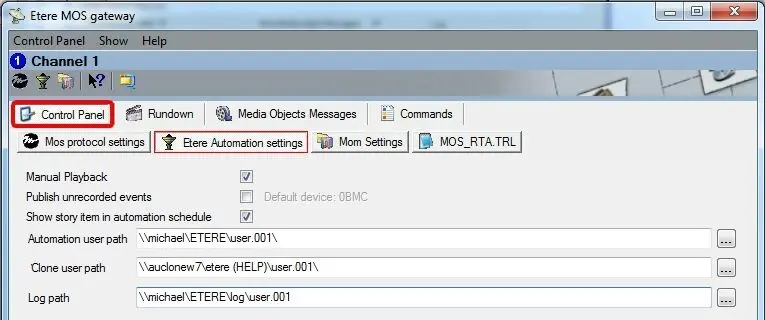
This section refers to Etere Automation configuration; the available options are:
•Manual Playback: all events contained in the Running Order are considered as events with manual property. The operator will have to manage the play-out manually ending the event on air and starting the one in CUE, using the SKIP function.
•Publish non-recorded events: the activation allows one to send to Etere Automation objects not yet recorded. An object not recorded and sent to Automation is automatically updated once recorded. To define the Default Device edit the MOS_RTA.TRL on 'clip25.shs.mos,1,OMN ,$c0ff62. Remember to keep a copy of these files because when you update the workstation these files are replaced by the default one.
•Show story item in automation schedule: in Etere Automation a row containing the name of the story is displayed.
•Automation path: Indicate the path to the folder where the master automation is installed. This folder will be used to publish the Running Orders coming from the Newsroom system (e.g.: ENPS).
•Clone user path: Indicate the path to the folder where the clone automation is installed. This folder will be used to publish the Running Orders coming from the Newsroom system (e.g.: ENPS).
•Logs Path: it is the path where to save logs of Etere MOS Gateway application.
MOM SETTINGS
Mosgate_momsettings
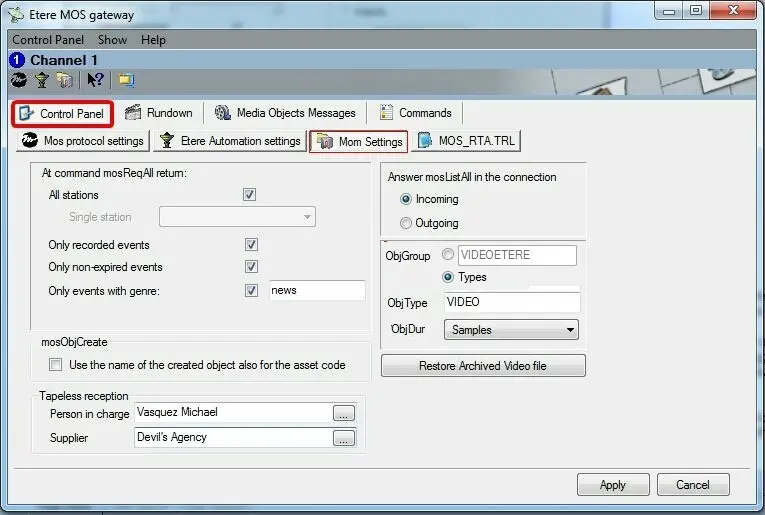
This section refers to the management of assets (objects) sent by Etere MOS Gateway to the Newsroom system (e.g.: ENPS).
•All Stations: if activated the search will be for all the assets of all stations enabled
•Single Station: if all stations are disabled you can select for which station to enable on the asset form.
•Only recorded events: if activated, Etere MOS Gateway sends only recorded assets to the Newsroom system (e.g.: ENPS).
•Only non-expired events: if activated Etere MOS Gateway checks that the same assets have not expired before sending them to the Newsroom system (e.g.: ENPS). An object is "expired" when in the "Rights Management" section of its asset form there is an expiry date preceding the current date.
•Only events with genre: if activated Etere MOS Gateway only sends assets of a specific genre to the Newsroom system (e.g.: ENPS). The filter requires the creation of genres and their assignment to assets. The creation of genres is done under Etere Configuration | Settings | Basic | Genres.
The Genres' assignment to assets is done in the asset form – "General Data" section. If some objects of a different genre have already been sent, the activation of a filter causes the cancellation in the Newsroom system (e.g.: ENPS) of all objects having a genre different to the set one.
•Use the name of the created object also for the asset code: If enabled, each time a new asset (i.e. placeholder) is created for a MOS Object, the asset's code will be equal to the object name (which is always used also as the asset's title).
Please note that the asset ID is automatically created by Etere.
•Tapeless reception: In case the created asset (i.e. placeholder) is intended to be delivered via web through the Etere Tapeless Reception service, set here the information related to its delivery (i.e. the station's person in charge of receiving the asset as well as the supplier who will deliver the asset's media) to be included among the new asset's tapeless information.
•Answer mosListAll in the connection: The Newsroom system (e.g.: ENPS) can ask for the asset list from Etere system by using two procedures:
1. The first one allows Etere MOS Gateway to answer by sending single assets, one after the other, at a distance of one second from one to the other.
2. The second one lets Etere MOS Gateway generate an XML file format containing the list of all assets that will be sent to the Newsroom system (e.g.: ENPS).
This parameter (i.e. answer mosListAll on the connection) only refers to the latter mode and allows one to choose whether to send the XML file in the incoming or outgoing port.
•OBJ...: Specify some key properties related to the MOS Objects managed by the application:
ObjGroup: Define the group (or groups) to be used for cataloguing objects sent to the Newsroom system (e.g. ENPS). Groups can be based on either a manually inserted single group (e.g. VideoEtere) or type-based selected groups (e.g. News, Movies).
Please note that in case of type-based groups, the Newsroom system will create so many folders as types specified here.
ObjType: Specify the type of the object media, for example, video, live, etc.
ObjDur: Indicate the format (i.e. samples, seconds, milliseconds or frames) with which the duration of an object is sent by the Newsroom system.
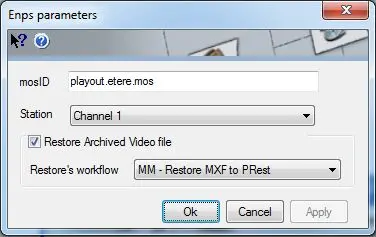
•Restore Archive video Files: Set here the identification of the Media Object Server, the station to which the news broadcast is related and the T-workflow to be used for restoring video files:
Mosgate_enpsparameter
MOS_RTA.TRL
This section refers to the MOS_RTA.TRL file that is the file to be published and from which the automation (set as MOS) will read the rundown. This RTL file is formed by various lines which indicates the events to be transmitted.
Each line present in the MOS_RTA.TRL file is formatted as follows: [mosId(objID)],[objType],[supportPrefix],[lineColor] (e.g. studio.etere.mos,1,0BMC ,$c0ff62), where:
•mosId(objID): The MOS_ID for RunDown, this value could differ from the one defined in "Settings MOS protocol" section, whereas the first one refers to the mosID contained in the RunDown the latter allows communication between NRCS and Etere MOS Gateway.
ENPS default configuration provides the same mosID both for identification and communication with an external MOS object (Etere) and for the RunDown. It is also possible to configure the Newsroom system (e.g.: ENPS) in order to redirect the mosID inside the RunDown. In this case the mosID assigned to RunDown (different from the other one) must also be configured in the section "MOS_RTA.TRL".
•objType: object type identifier:
0=unknown
1=videoserver
2=live (cameras)
3=Tag
4=SupportUnchanged
NB: In this configuration there is a predefined setting for a specific objectID (objID). The instance camera1,2,0LIVE00006,$00ecff means that when Etere Mos Gateway will receive a RunDown containing an object with "camera1" ID, it will identify it as a LIVE (objType = 2), and will therefore insert in Etere an asset form "0LIVE00006". Moreover, the colour "$00ecff" will be assigned to the object (hexadecimal value) and will appear in the schedule's line.
•supportPrefix: the first five letters of Etere support code (e.g. 0 MTX).
•lineColor: hexadecimal value of the colour assigned to the asset, in BRG (not RGB).
NB: During configuration these values are delimited with a comma (","). In default configuration mosID is set as "playout.etere.mos". It must be substituted inserting the mosID set in "Mos Protocol Settings, mosID".
 Mosgate_momsettings
 Mosgate_autsettings
 Mosgate_enpsparameter