201.3.2.1 General tab
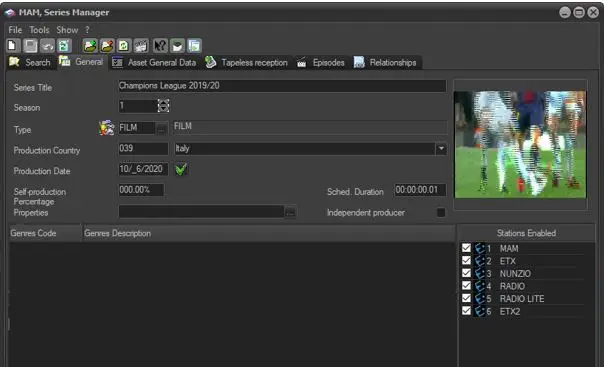
Under this tab you can enter a brief description which usually is the Serie's main title. Assign the appropriate type to the season in question and specify the production country of the season.
Bms_series_manager_1
Field - Title
Description : Enter the main title of the season.
Field - Season
Description : It indicate the season number to which the season episodes belongs to.
Field - Type
Description : Select from the list of asset type. The types are defined in Etere Configurations > Settings > Types.
Field - Production Country
Description : Select from drop-down list the country where the season has been produced.
Field - Production Date
Description : Enter the date on which the season has been produced. Pressing the "check" button inserts the current date automatically.
Field - Self-Production Percentage
Description : Indicate the station's production percentage that will determine if the season is:
self-produced - The season' "self-production percentage" is equal to 100%.
co-produced - The season' "self-production percentage" is greater than 0% but less than 100%.
other-produced - The season' "self-production percentage" is equal to 0%
Field - Properties
Description : Enter a unique value to group different relevant season into same catalog, the maximum characters allowed is 20. You can use the browse button to select an existing value from the system.
Field - Independent Producer
Description : Specify if the season has been produced by an independent producer. This information is used by the Events Log Report and Statistics Report to specify under the "self-produced / other produced" column if the season has been produced "independent" (i.e. by an independent producer).
Field - Scheduled Duration
Description : Insert the expected scheduled duration of the asset, this duration will be applied to all episodes.
Field - Thumbnail
Description : An image can be associated to the asset form by right-click in the gray-square and 'inserting a thumbnail'.
Field - Genre Code & Description
Description : By right click in the Genre section you can associate the asset to one or more genres.
Field - Stations Enabled
Description : Select which stations should be enabled, this is an individual selection, stations can be enabled by assets type under the Etere Configuration | Settings | Types | Types for stations section. A season disabled for a certain station can only be viewed from that station (if the operator has the proper rights). Moreover, by right-click on this section it can reset the rights of the season, please note that this action requires supervisor privileges.
NB: Please note that all changes performed to season' data will be automatically logged in the "operations" tab of all the episodes derived from the season.
 Bms_series_manager_1