72.2.2.41 Annotations - SDI Player
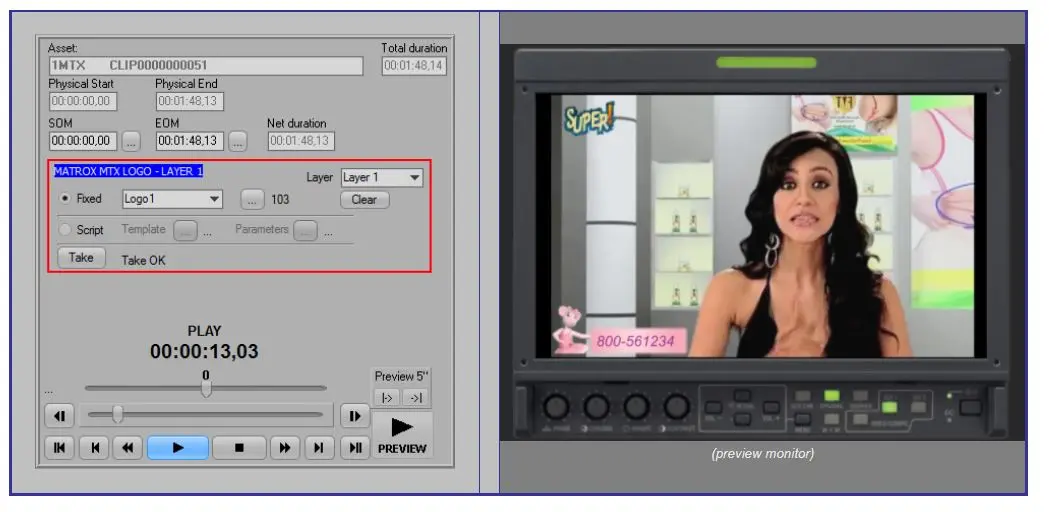
The SDI Player allows previewing a hires file using a decoder of the video server in which it's stored (and configured), browsing the video directly on the monitor connected to said decoder:
3796_SDI_Player
Clip information
Display key information on the played file including:
Asset: The media code of the video server (e.g. 1MTX) and the media name of the file (e.g. clip000000000051).
Physical start: The physical mark-in of the media file.
Physical end: The physical mark-out of the media file.
SOM: The logical mark-in that determines the media start. Pressing the arrow button sets the current playback point as the new SOM.
EOM: The logical mark-out that determines the media end. Pressing the arrow button sets the current playback point as the new EOM.
Total duration: Global duration calculated from the physical start to the physical end.
Net duration: Effective duration calculated from the SOM to the EOM.
Graphic controls
This panel allows overlaying logos or executing scripts while previewing media:
Logo: If enabled, the selected logo will be overlaid into the selected layer.
Script: If enabled, the selected CTM template will be executed with the given parameters.
[Take]: Press this button to either overlay the selected logo or execute the script.
[Clear]: Press this button to remove the overlaid logo from the preview.
NB: This panel requires enabling the resource for preview as explained in "required settings".
Playback controls
In the bottom part are available the playback controls for the preview.
[E/E] - Press this button to quickly switch the preview between the decoder and "live" channel.
NB: This button is available only if the video server supports the E/E feature, and only when previewing scheduled events from Executive Editor.
Preview from "Media Library"
Under Media Library, this player is available only when double-clicking on hires files stored in video servers, Etere will ask the user if the preview should be performed using either the SDI Player or the Etere Player (if licensed for the current PC).
Preview from "Executive Editor"
The SDI Player is also available from other Etere modules such as Executive Editor, through the "Preview > Full resolution SDI with jog & shuttle" option of the playlist's contextual menu.
 SDI_Player