54.5.2.4 Seasons
The Seasons section allows to schedule television seasons, providing the possibility to take complete control even over the reruns. To start programming an event, search for it using the [Seasons] button and then compile the following parameters:
Seasons
Parameter - Event Code
Description: Search for the season's episodes to be scheduled. Season Manager manages seasons.
Parameter - From - To
Description: Insert the dates range in which the season's episodes will be scheduled. By default, the validity period of the seasons is selected.
Parameter - Priority
Description: Specify the priority with which seasons episodes will be scheduled. An event's priority is the criteria Etere uses to determine its position within a commercial cluster during the scheduling phase. This priority starts from 1 (highest) to 1000 (lowest).
Parameter - From Episode No.
Description: If it is intended to schedule only a part of the entire season, indicate the episode number from which the scheduling will start.
Parameter - Scheduled times
Description: Enter the specific times at which the events will be scheduled. Specifying the exact weekdays on which seasons episode should be scheduled will be possible.
Parameter - ReRun
Description: Enable this option to schedule episodes also known as reruns (i.e. repetitions of transmitted episodes)
Set the rerun "scheduled times," as explained previously, for regular episodes.
Parameter - Days
Description: Select the days for which the event to be scheduled is valid and in which it will be scheduled:
All - On every day of the week, in the period of the dates indicated.
Even - Only on even days (e.g. 2-4-6-8...30) in the chosen period, independently of the day of the week.
Odd - Only on odd days (e.g., 3-5-7-9...31) in the chosen period.
Specific days - You can select the weekdays (e.g. Monday and Friday) on which you want the commercial asset to be scheduled.
Once all parameters have been correctly set, press the [RUN] button to proceed with the seasons-scheduling process, scheduling first the episodes and then the reruns (if enabled).
NB: If the requested schedule spaces are more significant than the episode number of the seasons, a message (i.e., 'Not enough episodes') will warn the operator about this issue.
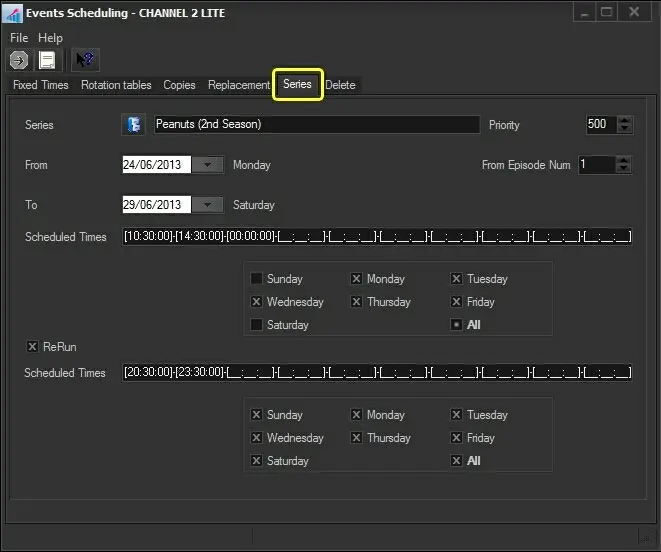 Seasons