59.3.10.3 T-Workflow data
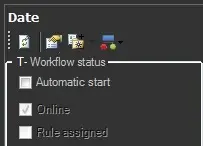
The T-Workflow Data area, which is located in the left part, allows managing the most important information and properties of the current T-workflow, including:
T-Workflow_Data
Refresh - Updates the list of actions by reading the database.
Properties - Change the following T-workflow properties:
Friendly name - Give the T-workflow a short and self-explaining name (preferably in English).
Local name - Give the T-workflow a name in your local language.
Category - Group under which the T-workflow will be categorized.
Description - Enter a brief text describing the scope of the T-workflow.
Reset on start command if - In case an already started T-workflow receives a "start" command, it will be automatically restarted only if its current state is one of the ones selected here:
• aborted
• faulted
• completed
• running
• never (default)
• always
NB: It is recommended to enable the "Aborted", "Fault", and "Completed" options to manage the T-workflow better.
Rules - Select the types (e.g. movies, music, news, etc.) to which the T-workflow will be automatically attached immediately for existing assets and after their creation for new assets.
For instance, select the "movie" type and enable the "Only selected" option do that:
•All movie assets in the system get the T-workflow immediately attached.
•Every time a new movie asset is created, the T-workflow is automatically attached.
NB: To automatically execute T-workflows when attached, the automatic start must be enabled below.
T-Workflow action - Quickly create a "T-workflow action" for the current open T-workflow. It's worth mentioning that T-workflow actions allow managing (e.g. trigger, reset, etc) instances of other T-workflows.
Status - View the current status of the T-workflow in question.
Automatic start - If enabled, the T-workflow will be automatically executed when attached to an asset; that is, it won't be necessary for operators to press the "start" button.
Online - Indicates if the T-workflow is currently available for being launched.
Rules assigned - Indicates if the T-workflow has been assigned to specific asset types.
 T-Workflow_Data