59.2.48.10 HSM
The HSM section is related to archiving operations in charge of Etere HSM; here it is possible to set some key rules that will be applied when archiving the current asset type:
modify_types
Delete file after archiving - If enabled, source files will be deleted from the disk once successfully archived; otherwise (disabled), source files will be kept in their original location.
Copies - Specify the number of archiving copies to be performed for assets belonging to the current type. Archiving copies must be configured under the related "Copy" tab (i.e. 1, 2, 3 ...).
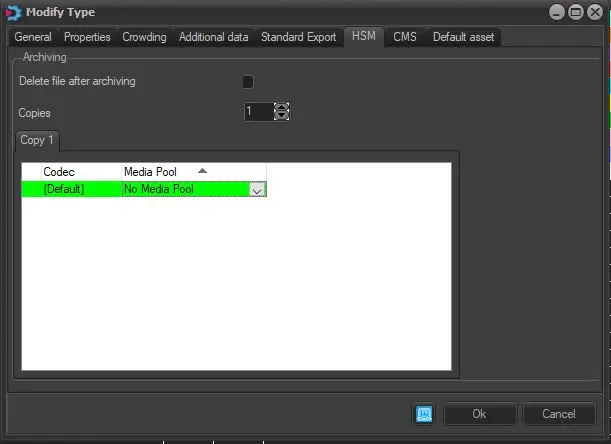
Copy 1 (2, 3 ...) - The "Copy" tab allows you to add copies (or copies, depending on the number specified in the "Copies" parameter) of archived data into a specific Media pool. If the "Copies" parameter is specified as "0", all clips would be archived as a unique copy in the default system media pool (i.e. "No Media Pool").
By changing the copies from "0" to "1" allows to modify the settings:
When adding an archiving copy, take note of the steps described below:
1. You need to select the destination Media pool for each copy. If the codec for archiving is not required, you must set the codec as "[Default]". Refer to the Media Pool section for more information about selecting a media pool.
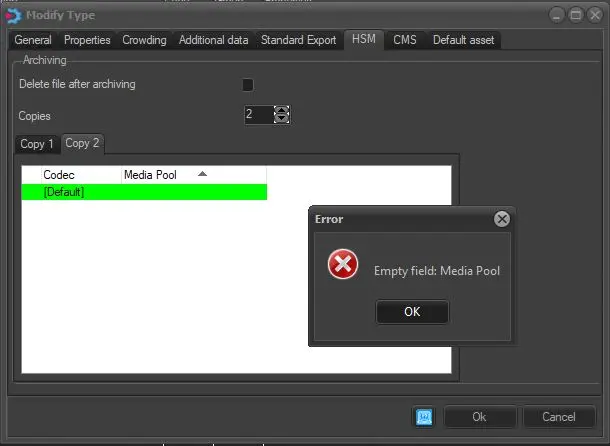
2. For additional copies of archived data (e.g. Copy 2), you need to complete the configuration in the "Copy 1" tab before you can modify the "Copies" parameter. For instance, an error message would be prompted without specifying the destination Media Pool in the "Copy 1" tab and attempting to change the Copies parameter.
Copies
3. The Codec for each Copy cannot be repeated, and it cannot be edited.
4. To delete a copy, right-click on the copy line and select "Delete" to remove the selected copy.
NB: Please note that if an archiving copy (e.g. WMV -> MP_Proxy) is set two times, that is, it's duplicated, a warning message will be displayed to indicate that it will be not possible to save changes without fixing this issue.
For instance, as illustrated in the image above, in case the number of copies is set to "1", it will be possible to specify under the related "Copy 1" tab that all "WMV" files should be archived on the "MP_Proxy" media pool. In contrast, all the rest of the "default" codecs will be archived in the "MP_Commercials" media pool.
Suggestion: To perform a redundant archiving of your contents, it's suggested to create two different copies (e.g. copy1 and copy2) containing two different media pools (e.g. MP_Spots_Main and MP_Spots_Backup) for the same codec (e.g. MPG), this configuration will make HSM to archive two copies of the same content into two different locations, thus increasing the redundancy and reliability of the archiving process.
Maintenance tasks - It's worth mentioning that in case some media assets (e.g. either all of a certain type or only those of a certain codec) result archived in media pools different from the ones specified here, it will be possible to reorganise them just by using the 'Realignment of the content of the Media Pools' maintenance task that will move them to the default media pool (e.g. "No Media Pool").
 Copies
 modify_types