59.5.7.23 Type of Asset
Report Description
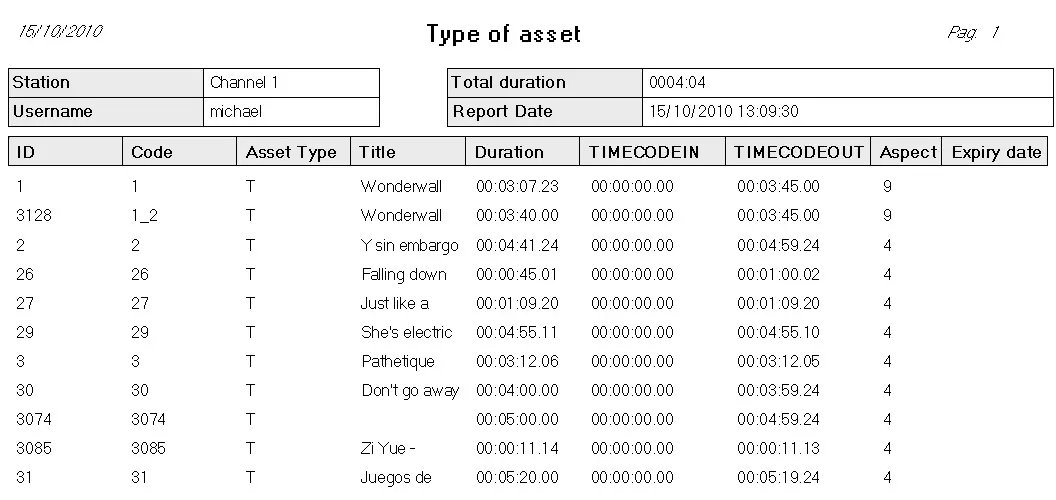
This report permits printing a list of assets filtered by their type, allowing the saving of custom layouts as models.
Report Filters
All the parameters that permit detailed report generation have been spread across seven different tabs to allow for a more straightforward configuration. By default, all filters are disabled (i.e., either blank or unselected); to enable them, it is enough to configure at least one parameter inside. Available filters include:
•Type
- Type: Specify the ASSET TYPE to which the report is related,
- Model: A model is a template containing custom settings and layout.
- Save / Delete: Allows models to be either saved or deleted,
- Station: Select the station from which the asset's data will be retrieved,
- Blank codes only: Enable the report to include only those types whose code is empty.
•Config
Here, it is possible to define the report layout, which can be saved as a model in the Type tab. To define a print layout, move the fields to include in the report from the list on the left to the empty list on the right, using the appropriate arrow buttons. Once added, fields are displayed as columns; these columns can be modified (i.e., position and width) to fit the user's needs.
Report Preview
The [Settings] permits configuring the page layout of the outgoing document; once filters and settings have been set, it will be possible to select between displaying a preview using the related [Preview] button or printing the document directly using the [Report] button. Please note that some reports permit the export of the generated document in the most common formats (PDF, CSV, doc, xls, XML) just by using the [Export] button.
Type_of_Asset
 Type_of_Asset