59.3.9.92 Set current metafile
Action Description
The "Set current metafile" action allows setting the reference metafile (e.g. MOV file stored in hires archive) of a T-workflow instance; this information enables performing operations (e.g. read file metadata, set file metadata, add files to the video server, etc.) specifically for that metafile.
Note
In case you set a "current metafile" for a certain T-workflow (e.g.A), the current metafile will be inherited by child T-workflows (e.g. B) triggered from within the parent T-workflow (A) using a "T-workflow Action".
Action Parameters
To create this action, complete the following data:
General info
Name - Enter a self-descriptive name for the action (e.g. Set current metafile to "MOV on Omneon1")
Select codec¹ - Specify here the codec (e.g. MOV) to be used as a reference
Select device¹ - Specify here the meta device (e.g. Omneon01) to be used as a reference
¹ Leaving the codec and device blank doesn't force the action to select the current metafile based on this criteria. If two or more asset's metafiles meet the filtering criteria, no metafile will be set to avoid ambiguity.
Depending on the success of the requested operation, one of the following results will be returned by the action:
Metafile successfully set (metafile successfully set)
Metafile not found (asset doesn't have any metafile matching the given device and codec)
How to use it
To set a reference metafile (e.g. WMV files stored on the proxy archive), for example, from the Media Library module, it is first required to include the "Set current metafile" action into a T-workflow using the T-Workflow Designer:
workflow_actions_set_current_metafile
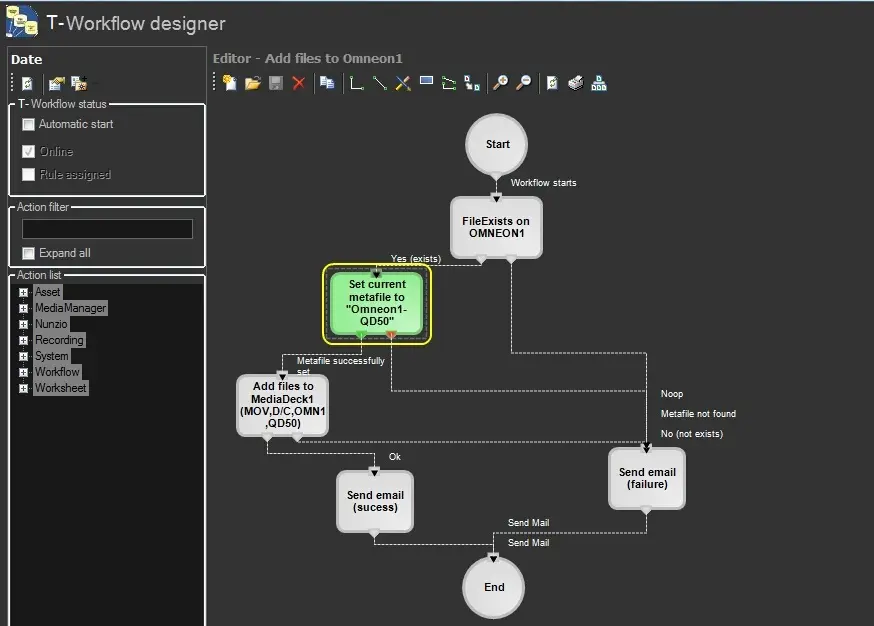 workflow_actions_set_current_metafile