18.4.6.1 Parameters
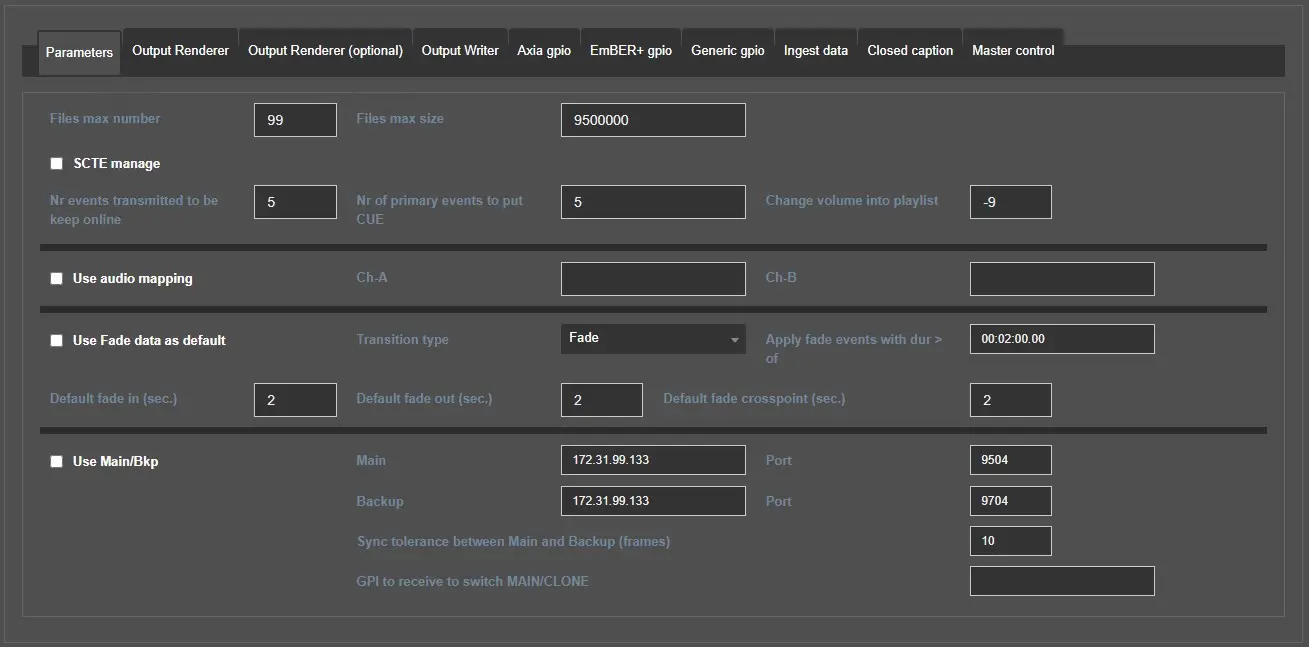
In this tab it's possible to configure the Engine's general parameters, which are divided in 4 sections:
engine_service_parameters
Playlist and logging
Files max number/size: select the the number of max of log files you want to be generated by Radiolive Engine Service and their max dimension in bytes.
SCTE manage: Enable this flag if the Engine Service should manage the sending of SCTE35, SCTE104 or ANC data in the output signal.
Nr events transmitted to be keep online: Set how many transmitted events have to be kept in the playlist before unloading them.
Nr of primary events to put CUE: Choose how many events should Engine service cue.
Change volume into playlist: Set (in dB) how much the playlist's volume have to be reduced when a MEDIA_OVER (an audio playing over the playlist) is being aired.
Audio mapping
Use audio mapping: Enable this flag to use the audio mapping for the output signal.
Ch-A/Ch-B: Specify here the mapping for channels A and B.
Fade
Use Fade data as default: Enable/disable the usage of transitions.
Transition type: Select which transition have to be applied.
Apply fade events with dur > of: The transition selected will be applied only to the events which duration is greater than this value.
Default fade in (sec.): Set the default duration in seconds of the FADE IN.
Default fade out (sec.): Set the default duration in seconds of the FADE IN.
Default fade crosspoint (sec.): Set the default duration in seconds of the CROSSPOINT.
Main/Backup
Use Main/Bkp: Indicate if the Radio Live system is composed by a single playout running as MAIN (disabled) or by two playouts identified as MAIN and BACKUP (enabled). Activating this flag, will enable also the fields for the IP address and port.
Main: If the main PC is selected on "PC name" droplist on top, the MAIN ip address and port won't be editable as they're automatically retrieved. Instead, it must be specified if the backup PC is selected.
Backup: If the backup PC is selected on "PC name" droplist on top, the BACKUP ip address and port won't be editable as they're automatically retrieved. Instead, it must be specified if the main PC is selected.
Note: If the setup of the radio system has been made correctly, the same addresses and ports would be also displayed in Etere Configuration > Settings > Schedule parameters > Station tab and the Advanced automation option must be enabled.
Sync tolerance between Main and Backup (frames): Set the minimum difference tolerated of frames between MAIN and CLONE engines. If this threshold is crossed the BACKUP will realign with the MAIN.
GPI to receive to switch MAIN/CLONE: Set the gpi dedicated to the switch MAIN/CLONE (based on the system owned, an Axia, Ember+, or Generic GPIO can be set and dedicated to make the transition from main to clone).
 engine_service_parameters